<![CDATA[Max Hamulyák · Kaylumah]]>https://kaylumah.nl/feed.xml2024-10-26T12:05:19+02:00https://kaylumah.nl/assets/logo_alt.svgKaylumah Site Generatorhttps://kaylumah.nl/2024/08/06/fix-vscode-markdown-preview.html<![CDATA[Fixing VSCode Markdown preview with symbolic links!]]>2024-08-06T17:30:00+02:002024-08-06T17:30:00+02:00Max Hamulyákmax@kaylumah.nlMany static website generators support writing blogs in Markdown. Jekyll and several other generators organize content, such as blog posts, and assets, like images and CSS files, into separate directories.
My favorite editor for writing Markdown is VSCode. While this separation is useful for organization, it can be somewhat cumbersome when editing and previewing Markdown.
To illustrate this point, let’s look at an example. A typical directory structure looks like this:
# generated with the command tree -L 2
.
├── _posts
│   └── hello-world.md
├── assets
│   └── logo.svg
└── index.html
Using the Markdown preview feature of VSCode that would look like this:
If you’re like me, your project contains many more files than the few shown in the example. In such cases, I prefer working inside the _posts folder. Unfortunately, as the screenshot below shows, this breaks the image preview functionality.
Instead of displaying my logo, the preview now shows a broken image icon. Technically, this behavior is correct because, relative to our “hello-world.md” post, there is no “assets” directory. You might think that changing the path to “../assets/” would solve the issue, since that’s where the folder exists on disk. However, VSCode does not allow this due to security concerns. Even if it did work, it would create the issue that the preview would no longer function correctly when opened from the root directory.
To my knowledge, there is no built-in function in VSCode to address this issue. However, there is an operating system-level solution: using symbolic links.
We can create a symlink by running the following command inside the "_posts" directory
ln -s ../assets assets
From the filesystem perspective the "_posts" folder now has a subfolder called posts. If we now open it inside VSCode it renders the image correctly.
]]>https://kaylumah.nl/2024/02/09/long-live-reqnroll.html<![CDATA[Specflow has died; long live Reqnroll!]]>2024-02-09T21:00:00+01:002024-02-09T21:00:00+01:00Max Hamulyákmax@kaylumah.nlToday's post is a short one. My goal is to spread awareness inside the .NET community that on 2024-02-08 at 14:56:14Z, Specflow was pronounced dead. The statement was made by none other than Gáspár Nagy, the original creator of Specflow.
For those who don't know, Specflow is (or I suppose was) the official Cucumber implementation for .NET, which has been open-source all the way since 2009. With Cucumber, you write tests using the Gherkin language. This allows for human readable tests and many more incredible advantages. One of the last things I did at my previous company was give a dev talk on all things Specflow and my experiences using it.
Somewhere in the past, Specflow was sold, and unfortunately, for the past two years, the project has seen no activity. Gáspár has made the decision to fork and revive it under the name of Reqnroll(pronounced as [reknroʊl]). He has done a lot of grunt work, and now it is up to him and the community to keep it alive.
A migration guide was published, and it is as simple as changing a package and changing a few namespaces. I think the migration took me about 15 minutes, and it was done. There is even a package published for backwards compatibility, so even fewer changes are required.
Most of the tests for the blog and static website generator you are reading this article on were written using Specflow (and now rewritten!). I was planning out a bunch of articles on this topic, but with a new job and everything, time got away from me.
I'd like to personally thank Gáspár for the effort to first revive Specflow and now for the process of starting the fork and a brand new community. I hope the efforts will not be in vain and we can make the project successful. I will make it a priority that upcoming content will make use of Reqnroll! Not only because I love this way of writing tests but also to show that Gáspár has my full support moving forward!
]]>https://kaylumah.nl/2023/04/14/csharp-client-for-openapi-revisited.html<![CDATA[Generate C# client for OpenAPI - Revisited]]>2023-04-14T00:00:00+02:002023-04-14T00:00:00+02:00Max Hamulyákmax@kaylumah.nlI am working on an article for the blog that relies on a C# generated Open API client. I wrote an article on that a few years ago called "Generate C# client for OpenAPI". So I decided to check if the advice from that post would still be valid today. Combined with the fact that, according to analytics, it is one of my most popular articles to date, this post was born.
The solution provided relied on using an MSBuild task to generate the API on build using a tool called NSwag. However, even back then, in 2021, an alternative was already available. Steve Collins, another dotnet content creator, published an article called "Using OpenApiReference To Generate Open API Client Code". The alternative directly adds OpenAPI support to the project while still using NSWag under the hood. Back then, Steve mentioned that there was little documentation, and I was already familiar with doing it manually, so I decided to stick with that. Today I wanted to compare doing it manually or via the built-in mechanism.
The purpose of the post is not to detail how to configure an OpenAPI spec for your project since the standard template already supports Swashbuckle. You can find more information on that over at Microsoft Learn. One thing I like to add to the standard template, is that I want the specification to be part of the project output. We can achieve that with the Swashbuckle CLI, which you can install with the command dotnet tool install --local Swashbuckle.AspNetCore.Cli --version 6.4.0. Note that the version of the CLI must match the version of Swashbuckle used in the API project. After you install the tool, you can modify the csproj to look like this.
The swagger command takes the output location (OutputApiDocument), the DLL for the specification (ApiDll) and the document name (OpenAPIDocumentName) as input parameters. The default name of the API document is v1. We use some existing MSBuild properties to populate these parameters, so in our case, OutputPath looks like bin/Debug/net7.0/ and AssemblyName is Demo. That means that after the project builds, a file bin/Debug/net7.0/Demo.json will contain our Open API Specification.
Note that as part of the bin folder, the specification is not under source control. Sometimes I place it in the project root to track any changes made to the specification. Doing so is especially useful for monitoring unexpected or unintended changes to the specification.
To add NSwag manually to our project, we need the NSwag.MSBuild NuGet package. Which we can install via dotnet add package NSwag.MSBuild --version 13.18.2. The process is mostly the same as I detailed in 2021; one of the few changes is the target framework to use. Modify the csproj as follows:
You can uncomment $(NSwagExe_Net70) new to generate a fresh nswag.json, the configuration file used for NSwag. After you have the config file, you still need to specify the runtime, the document, and the output location. Abbreviated the change to the file looks like this:
I don't remember it being possible back in 2021, but you can now change the JSON serializer used in the generated client. You can do so by modifying the value of codeGenerators openApiToCSharpClient jsonLibrary to SystemTextJson. If you do not do this, you must install the Newtonsoft.Json package, or the generated code will not compile.
I can imagine that people do not like the manual way, especially if you don't know the inner workings of MSBuild; it can feel a bit like magic. Adding an OpenAPI reference via Visual Studio is as simple as right-clicking any project and choosing add connected service.
By choosing the option "Service reference..." instead of "Connected Service" you get the second prompt immediately. By selecting "Connected service" you get the overview of all connected services for the project and then need an extra click to add the service reference.
We can customize the input for the msbuild task on the third screen. We only need to specify the file location of the Open API JSON.
By selecting "finish", Visual Studio will make all necessary modifications. Easy right? The project file should now look like this:
The generated code will be in the obj folder if you build the project. As mentioned above, the API specification is in the Debug/net7.0 folder, so it will break if I retarget this solution to a newer framework. That is another reason to just put the specification at the root of the API project.
You may wonder if it is as simple if you do not have Visual Studio as your IDE. It is; Microsoft published a dotnet tool for this exact reason. You can install it by running dotnet tool install --local Microsoft.dotnet-openapi --version 7.0.4. You can add the API specification by using a terminal from your project's directory and running the following command.
Yeah, that is right, it is similar but not the same as if done via Visual Studio.
The package Microsoft Extensions ApiDescription Client is missing.
The version for NewtonSoft is different.
The CodeGenerator is not specified, and it defaults to NSwagCSharp.
I expected the tool to use the same templates as Visual Studio, but this is not the case. The missing package is still used, but as a transitive dependency of NSwag.ApiDescription.Client, with the installed version it is just a preview build.
Do note that it is not required to use the dotnet tool for this; you can manually add the same lines as provided above. The tool is just there for convenience. Documentation for the tool is still somewhat limited but is described at the docs over here.
We have already seen that for the manual approach, making changes to the configuration can be done by modifying the nswag.json, a file we do not have when using OpenApiReference. So this section will go into making the same modification for this version.
Before I go into it, we must fix one issue with the template used so far. There is a glaring issue which only appears if you have built the project in different ways. For example, here is the output building from Visual Studio
1>GenerateNSwagCSharp:
1>  "C:\Users\hamulyak\.nuget\packages\nswag.msbuild\13.0.5\build\../tools/Win/NSwag.exe" openapi2csclient /className:DemoClient /namespace:ConnectedService /input:C:\projects\BlogTopics\MyBlog\src\Api\Demo\bin\Debug\net7.0\Demo.json /output:obj\DemoClient.cs
1>NSwag command line tool for .NET 4.6.1+ WinX64, toolchain v13.0.5.0 (NJsonSchema v10.0.22.0 (Newtonsoft.Json v11.0.0.0))
1>Visit http://NSwag.org for more information.
1>NSwag bin directory: C:\Users\hamulyak\.nuget\packages\nswag.msbuild\13.0.5\tools\Win
1>Code has been successfully written to file.
Compare that with the output from the dotnet CLI:
  GenerateNSwagCSharp:
    dotnet --roll-forward-on-no-candidate-fx 2 C:\Users\hamulyak\.nuget\packages\nswag.msbuild\13.0.5\build\../tools/NetCore21//dotnet-nswag.dll openapi2csclient /className:DemoClient /na
  mespace:ConnectedService /input:C:\projects\BlogTopics\MyBlog\src\Api\Demo\bin\Debug\net7.0\Demo.json /output:obj\DemoClient.cs
  NSwag command line tool for .NET Core NetCore21, toolchain v13.0.5.0 (NJsonSchema v10.0.22.0 (Newtonsoft.Json v11.0.0.0))
  Visit http://NSwag.org for more information.
  NSwag bin directory: C:\Users\hamulyak\.nuget\packages\nswag.msbuild\13.0.5\tools\NetCore21
  Code has been successfully written to file.
Do you see the issue? The CLI variant differs from the NSwag version used; it uses a NetCore21 dll. We get this behaviour because the templates use an outdated package version. According to NuGet the old version (13.0.5) is downloaded over 2 million times, whereas all other versions do not exceed half a million. After updating, the NSwag version will equal your project's target framework.
Back to the issue at hand, how do we customize the output? It is a mix-match situation. You can modify the Namespace and Client name directly by specifying them as properties on the OpenApiReference line like this:
Other options, like the JsonLibrary, need to be formatted differently. Like Namespace, there is an Options attribute. For example, we change the configuration below to use SystemTextJson and provide a custom name for the Exception class in the generated code base.
Any value set by nswag.json can also be provided here in the format /propertyName:value. I like to point out that properties like namespace can not be set here, so the following snippet will not work.
It has a duplicate /Namespace, and the first wins. The only way to customize the namespace is by providing it as an attribute. Otherwise, the default value, which is the assembly name, will be used.
In conclusion, I cannot deny that the OpenApiReference feels a lot easier than the manual approach. It has its issues. For example, the lack of documentation configuring the generated code is disappointing. I also think it is weird that the different approaches between Visual Studio and command-line are out of sync and that both templates are outdated. It makes me question if people are using it. Both reasons are not a hard no-go for me. The new approach does feel less like magic, but the trade-off for me is that the settings used are less transparent than a nswag.json file. As I showed in the previous version of this article, NSwag can also function without specifying all options and will apply the defaults themselves. I like things to be explicit, so that is a point in favour of the manual approach, that it gives me a choice to specify everything or omit the things I don't need. The abstraction might have been better if we could still provide a config file or if there were properties that Microsoft would map to NSwag stuff internally, decoupling my code generation from the implementation. What do you think about this? Which version do you prefer?
As always, if you have any questions, feel free to reach out. Do you have suggestions or alternatives? I would love to hear about them.
The corresponding source code for this article is on GitHub.
See you next time, stay healthy and happy coding to all 🧸!
]]>https://kaylumah.nl/2022/09/17/how-to-use-azurite-for-testing-azure-storage-in-dotnet.html<![CDATA[How to use Azurite for testing Azure Storage in dotnet?]]>2022-09-17T18:00:00+02:002022-09-17T18:00:00+02:00Max Hamulyákmax@kaylumah.nlHow to test a dependency on Azure?
A recent project tasked me with integrating an application with Azure Blob Storage. Due to my post "Working with Azure SDK for .NET", I knew all about the current SDK to interface with Azure. The team in charge of the dotnet SDK has done a great job with providing accessible samples. My previous post did not focus on the testability aspects of the System, mainly because it was a simple demo for production code that is, of course, a no-go.
There are a few ways we can go about testing this:
Create a mock or fake implementation of every Storage API required.
Hide the blob implementation behind an internal interface and mock that in your tests.
Create a real storage account (per developer) in Azure.
Emulate storage account.
The argument to go with option 1 / 2 is that you, the developer, are not responsible for testings Azure's internal components. Option 3 has the challenge of cost and test repeatability. Because option three hosts the dependency externally, you need to set up and teardown for anything done in your tests. For example, you cannot create a file with the same name twice. Option 4 has the problem: any emulator does not guarantee to be 100% equal to the real deal.
While I agree with the argument for the first two options, the point here is to test if we can successfully integrate with Azure (as opposed to asserting their SDK works as expected). You can debate if testing with emulators or Azure is still a unit test. Using EntityFramework's DbContext in a test would warrant the same definition question.
Important: if you only remember one thing from this post, let it be that every option except the third requires you to test in Azure. All other options are not the actual integration, and your application can behave differently once deployed.
The test solution I picked was using the popular open-source emulator called Azurite. The Azurite tool offers a local environment for Azure Blob, Azure Queue and Azure Table services. In the past, we also had Microsofts own Storage Account Emulator, but it appears that development on that has stopped, and the focussed shifted to Azurite.
There are several ways to run Azurite (i.e. Docker or NPM).
If we create a demo app and install blob storage via dotnet add package Azure.Storage.Blobs. We can connect with the following snippet:
using Azure.Storage.Blobs;

var connectionString = "DefaultEndpointsProtocol=http;AccountName=devstoreaccount1;AccountKey=Eby8vdM02xNOcqFlqUwJPLlmEtlCDXJ1OUzFT50uSRZ6IFsuFq2UVErCz4I6tq/K1SZFPTOtr/KBHBeksoGMGw==;BlobEndpoint=http://127.0.0.1:10000/devstoreaccount1;QueueEndpoint=http://127.0.0.1:10001/devstoreaccount1;TableEndpoint=http://127.0.0.1:10002/devstoreaccount1;";
var blobServiceClient = new BlobServiceClient(connectionString);
var properties = await blobServiceClient.GetPropertiesAsync().ConfigureAwait(false);
The snippet works because the connection string we provided is the default connection string for Azurite. It contains the default account known as devstoreaccount1 and connects over HTTP. The default connection string also assumes you are running blob, queue and table services. For example, on NPM you could run:
# Run only Blob
azurite-blob --silent --location c:\azurite --debug c:\azurite\debug.log
# Run only Queue
azurite-queue --silent --location c:\azurite --debug c:\azurite\debug.log
# Run only Table
azurite-table --silent --location c:\azurite --debug c:\azurite\debug.log
Most would stop here because what I have shown so far is more than enough to use BlobServices from test code. It even works in Azure Pipelines. I, however, am still not entirely happy with it.
In the post "Working with Azure SDK for .NET" I made a point that connection strings should be a thing of the past. The TokenCredential should be the way forward (dotnet add package Azure.Identity).
using Azure.Identity;
using Azure.Storage.Blobs;

var endpoint = new Uri("http://127.0.0.1:10000/devstoreaccount1");
var credential = new DefaultAzureCredential();
var blobServiceClient = new BlobServiceClient(endpoint, credential, new BlobClientOptions());
var properties = await blobServiceClient.GetPropertiesAsync().ConfigureAwait(false);
Based on the default configuration, the above snippet should have worked. However, you get the following error System.ArgumentException: Cannot use TokenCredential without HTTPS.
Azurite has an overload to provide HTTPS support. You can use a tool called mkcert to generate the required files.
# Run once
mkcert 127.0.0.1

# Run over HTTPs
azurite --silent --location c:\azurite --debug c:\azurite\debug.log --cert 127.0.0.1.pem --key 127.0.0.1-key.pem
Update the endpoint Uri to HTTPS:
using Azure.Identity;
using Azure.Storage.Blobs;

var endpoint = new Uri("https://127.0.0.1:10000/devstoreaccount1");
var credential = new DefaultAzureCredential();
var blobServiceClient = new BlobServiceClient(endpoint, credential, new BlobClientOptions());
var properties = await blobServiceClient.GetPropertiesAsync().ConfigureAwait(false);
If we run our test example now, it will fail with the warning that an SSL connection cannot be established. We can solve this with generating a CA certificate from mkcert with mkcert --install. However, even with a valid SSL certificate TokenCredential will still fail. For TokenCredential to work we need to pass --oath basic to Azurite.
Now that we can use TokenCredential, I am happy. The test instance of our BlobServiceClient is almost identical to the production configuration. We have established that it works locally, but how about a CICD environment? I modified the example pipeline to add the mkcert bits.
steps:
  - bash: |
      choco install mkcert
      npm install -g azurite
      mkdir azurite
      cd azurite
      mkcert --install
      mkcert 127.0.0.1
      azurite --oauth basic --cert 127.0.0.1.pem --key 127.0.0.1-key.pem --silent --location data --debug data\debug.log &
    displayName: "Install and Run Azurite"
Unfortunately, adding a certificate to the trust store requires a password prompt. On an Azure-hosted agent, this does not work and causes the agent to be stuck. To me, this could mean one of two things. Either the Azure team does not test over HTTPS, or they have a different set of test tooling. As it turns out, they have a set of helpers to construct the service clients and disable SSL verification. Like this:
using Azure.Core.Pipeline;
using Azure.Identity;
using Azure.Storage.Blobs;

var endpoint = new Uri("https://127.0.0.1:10000/devstoreaccount1");
var credential = new DefaultAzureCredential();
var blobServiceClient = new BlobServiceClient(endpoint, credential, new BlobClientOptions()
{
    Transport = new HttpClientTransport(new HttpClient(new HttpClientHandler
    {
        ServerCertificateCustomValidationCallback =
            HttpClientHandler.DangerousAcceptAnyServerCertificateValidator
    }))
});
var properties = await blobServiceClient.GetPropertiesAsync().ConfigureAwait(false);
It can now be used in Azure Pipelines like this (note the lack of mkcert --install)
steps:
  - bash: |
      choco install mkcert
      npm install -g azurite
      mkdir azurite
      cd azurite
      mkcert 127.0.0.1
      azurite --oauth basic --cert 127.0.0.1.pem --key 127.0.0.1-key.pem --silent --location data --debug data\debug.log &
    displayName: "Install and Run Azurite"
The testing helpers have more to it than disabling SSL but are not present on NuGet. So naturally, I raised an issue to the SDK team if they have any plans in that direction. Unfortunately, at this point, they have no interest in releasing their internal test tooling. The techniques I mentioned thus far can be used standalone. I, however, felt this was an excellent opportunity to create my first NuGet Package. The package cannot assume how anybody runs Azurite, so I introduced two classes. You can use AzuriteAccountBuilder to configure how things are run, like the account or the ports being used. The AzuriteAccount class provides access to stuff like the connection string. For convenience the package also creates helper methods to create BlobServiceClient, TableServiceClient or QueueServiceClient form an AzuriteAccount.
My package is designed for use in a test project so let us create a new test project (i.e. dotnet new xunit) and add my package to it dotnet add package Kaylumah.Testing.Azurite --version 1.0.0.
The most explicit way to create an AzuriteAccount is with the following code:
[Fact]
public async Task Test1()
{
    var account = new AzuriteAccountBuilder()
        .WithProtocol(secure: false)
        .WithDefaultAccount()
        .WithDefaultBlobEndpoint()
        .WithDefaultQueueEndpoint()
        .WithDefaultTableEndpoint()
        .Build();

    var blobServiceClient = account.CreateBlobServiceViaConnectionString();
    await blobServiceClient.GetPropertiesAsync();
}
The snippet above creates a connection string based on the default settings. That means it should match the connection string when someone runs Azurite without parameters. For convenience, I have also added a helper class that creates this default account for you.
[Fact]
public async Task Test2()
{
    var account = AzuriteHelper.CreateDefaultAzuriteAccountBuilder().Build();
    var blobServiceClient = account.CreateBlobServiceViaSharedKeyCredential();
    await blobServiceClient.GetPropertiesAsync();
}
The package offers the same convenience helpers for Queue and Table storage. You can use the connection string, shared key, azure sas key or token credential with the helpers.
I started this journey with knowledge about Azurite and the dotnet SDK for Azure. I knew from experience that I no longer wanted to work with managed identity instead of connection strings. I needed a way to have repeatable tests on local and CI/CD environments. The funny thing is that after I had everything working the way I wanted, I could not use the required API I needed. For a moment, I had forgotten Azurite is an emulator, and not all features are supported. So I had to fall back on shared key credentials, which work fine over HTTPS and could already be used in pipelines. Luckily I designed the package to work with a variety of configurations.
Usually, this is where I post a link to the posts GitHub repo. This time, the source code is the NuGet package on this GitHub Repo. In the post itself, I focussed on NPM; if you are looking for how to integrate with Docker containers, you can find an example test in the GitHub repo As always, if you have any questions, feel free to reach out. Do you have suggestions or alternatives? I would love to hear about them. Especially since this is my first NuGet package let me know if it helped you out.
]]>https://kaylumah.nl/2022/06/07/share-debug-configuration-with-launch-profiles.html<![CDATA[Share debug configuration between .NET IDEs with launch profiles]]>2022-06-07T23:30:00+02:002022-06-07T23:30:00+02:00Max Hamulyákmax@kaylumah.nlAnno 2022, as .NET developers, we are spoilt with multiple options for our development environment. Of course, having a choice sparks the debate that my IDE is better than your IDE. I feel that after bring your own device, we are moving to a bring your own IDE workspace. Given the rise of tooling like VS Code DevContainer and GitHub Codespaces, I think more developers will likely opt for such tooling.
Did you know that most of my blogs are written for use in dev containers and are available in GitHub Codespaces?
Each IDE has its perks but also its quirks. Who am I to tell you that tool X is better than Y. If you can work using the tool you prefer, you can be much more productive than a tool because the company said so. It does bring its challenges. For example, if you change a file in your IDE, I don't want it formatted when I open it in my IDE. My version control system will show more changes to a project than happened. Lucky for us, tools like .editorConfig help us a lot to streamline this process. I switch back and forth a lot between VS Code and Visual Studio. My team was working with Rider for a recent customer project. Keeping settings in sync between two IDEs was hard enough. So it made me wonder, is there an equivalent for .editorConfig but used for debug-configuration. I knew that Visual Studio has the concept of a launchSettings.json file. As I discovered, it is possible to make both Rider and VS Code play nice with launchSettings.json. It is by no means perfect, but at least for me, it solves some of the caveats in a bring your own IDE world.
If you were wondering, "Max launchSettings.json has been around for years; why are you writing this article?" The answer to that is straightforward. It bugged me a lot that I had to repeat myself. When searching for how to configure my IDE, I came across the ASP.NET Fundamentals - Environment. It suggests using the VS Code variant of configuration but does not mention that you can reuse your Visual Studio one. Reading that article prompted me to write down what I learned so that someday someone might benefit from it.
Let me begin with a quick recap about launchSettings.json. A launch settings file contains Launch Profiles. A Launch Profile is a kind of configuration that specifies how to run your project. Having these launch profiles allows you to switch between configurations easily. Typical scenarios are switching between Development and Production environments or enabling feature flags. Launch profiles are in the optional Properties\launchSettings.json file. For example, a freshly created console project will not have one, whereas a web API project will define one.
A launch profile has a couple of properties depending on the project type. I will highlight the ones that are relevant to this post.
commandName: the only required setting which determines how a project is launched. To work in every IDE this settings needs to be Project.
commandLineArgs: a string containing arguments to supply to the application.
environmentVariables: A collection of name/value pairs, each specifying an environment variable and value to set.
A few important notes:
Environment values set in launchSettings.json override values set in the system environment.
The launchSettings.json file is only used on the local development machine.
The launchSettings.json file shouldn't store secrets
For our sample application, we will create a new project using the "Console Template" with dotnet new console. Since it is a console, we must create a Properties\launchSettings.json by hand. At a minimum, the file would look like this.
The console app will build an IConfiguration and print it to the console. Since I don't feel like adding all my environment variables, I add only the ones prefixed with KAYLUMAH_, kinda like how .NET automatically includes variables prefixed with DOTNET_.
using Microsoft.Extensions.Configuration;

IConfigurationBuilder configurationBuilder = new ConfigurationBuilder();
configurationBuilder.AddEnvironmentVariables("KAYLUMAH_");
if (args is { Length: > 0 })
{
    configurationBuilder.AddCommandLine(args);
}
var configuration = configurationBuilder.Build();

if (configuration is IConfigurationRoot configurationRoot)
{
    Console.WriteLine(configurationRoot.GetDebugView());
}

Console.WriteLine("Done...");
Console.ReadLine();
I could not verify it online, but I think Visual Studio introduced launch settings as part of the first ASP NET Core release. Since launch profiles is a Visual Studio feature, I don't have much to add above the definition I've already given for the specification. One cool thing I like to mention is that running from Visual StudiolaunchSettings can reference MSBuild variables. That is a pretty handy way to provide something dynamic.
For our console, we see the following selection in Visual Studio:
For our API, we see the following selection in Visual Studio:
As you see, the WebAPI variant shows more than just our launch profiles.
Another aspect of development configuration is the ability to run more projects simultaneously. We can achieve this in Visual Studio by selecting multiple startup projects. As far as I know, this function is user-specific, which would result in every developer repeating information. Luckily there is a handy plugin called SwitchStartUpProject.
We can quickly provide multiple configurations. We can provide a ProfileName for each project that matches one in our launch settings. It is that simple.
As it turns out, launchSettings has been supported in Rider for a long time. They first introduced it in November 2018. As a matter of fact, to use launchSettings inside Rider you don't need to do a thing. Riderautomatically detects if your projects are using launchSettings. Not all features are supported, but using profiles of commandName project are. If you did provide MSBuild variable in launchSettingsRider would correctly pass them along.
A thing I like about Rider is that I don't need an additional plugin to support multiple start up projects.
It's important to check Store as project file; otherwise, you won't share it with your team. In this particular example, it will look like this:
Last but not least is VS Code, the reason I started this article. When you open a .NET project in VS Code, you get prompted to create a launch.json file. A launch.json file is very similar to a launchSettings.json. Both options provide the means to choose a project, set command-line arguments and override environment variables. The default launch.json does not pass any additional configuration to the project. So what would be the logical output of our command?
The answer might surprise you.
That is because you have secretly been using launchSettings.json the whole time. In May 2018, release 1.15.0 of the extension shipped launchSettings.json support. If you don't add launchSettingsProfile to your launch.json, it will use the first profile for a project that is of type "commandName": "Project". Ever had unexplained variables in your project? This is likely the reason why. Remember our default profile set an environment variable, and variables from launchSettings.json win from system environment variables. I recommend explicitly specifying launchSettingsProfile to make it clear that a) you are using it and b) if you change the order of profiles, you don't create unexpected changes for other developers.
Like Rider the support for this feature comes with a few restrictions:
Only profiles with "commandName": "Project" are supported.
Only environmentVariables, applicationUrl and commandLineArgs properties are supported
Settings in launch.json will take precedence over settings in launchSettings.json, so for example, if args is already set to something other than an empty string/array in launch.json then the launchSettings.json content will be ignored.
Since you can provide arguments and environment variables in both launch.json and launchSettings.json, let's look at an example.
Since launch.json specified args the commandLineArgs from launchSettings.json are ignored.
Since launch.json specified env and launchSettings.json specified environmentVariables both sets get merged.
Since launch.json will win, the value for KAYLUMAH_ENVIRONMENT is Development.
The default configuration for our web api looks slightly different because it adds support to open the browser after the project starts.
Our base URL comes from the launchSettings.json, but the launchUrl gets ignored. You can achieve the same behaviour by updating the generated serverReadyAction with an uriFormat.
Technically the Dotnet CLI is not an IDE, so consider this a small bonus chapter. I am including the CLI since it also uses launch profiles when running locally.
As it turns out the CLI also defaults to the first project in Properties\launchSettings.json, so in our case DemoConsole.V0. Just like VS Code did. The following example uses a bit of PowerShell to run the CLI.
# prints the default
dotnet run

# Sets env var for current session
$env:KAYLUMAH_COMMANDLINE="Session ENV var"
# prints COMMANDLINE + the default
dotnet run
If we don't want any launch profile just run dotnet run --no-launch-profile and to specify a profile run dotnet run --launch-profile "DemoConsole.V2"
As we discovered, it's more than likely that you were using launch profiles outside Visual Studio without realising it. I am not sure that not if unspecified, it is a sensible default to take the first one, particularly since someone can change the order of projects. I like that in at least three popular IDEs; we have an easy mechanism for sharing settings.
In the future, I am also hoping for a shared tool for compound configurations. At the very least, managing compound configurations using existing launch profiles is much easier than duplicating arguments and environment variables for each IDE. One last note is that I discovered that MSBuild variable replacement does not appear to be working from VS Code or the CLI. Not sure if that's a bug or by design, but it's important that not every IDE supports all features of the launchSettings.json. As always, if you have any questions, feel free to reach out. Do you have suggestions or alternatives? I would love to hear about them.
The corresponding source code for this article is on GitHub.
See you next time, stay healthy and happy coding to all 🧸!
]]>https://kaylumah.nl/2022/02/21/working-with-azure-sdk-for-dotnet.html<![CDATA[Working with Azure SDK for .NET]]>2022-02-21T21:30:00+01:002022-02-21T21:30:00+01:00Max Hamulyákmax@kaylumah.nlFebruary 2022 marks the 20th anniversary of the dotnet platform, which is quite a milestone. I found it the perfect time to reflect; I have been working professionally for almost six years and using .NET during the four years before that in my studies. For a dotnet blogger like myself, I could not stand idly by and let this pass without a post. February 2022 also marks another milestone for me. My first ever open-source contribution has been released into the wild. I made a small contribution to the Azure SDK for .NET. So in honour of both, I wrote this article with small tips and tricks I picked up when working with the SDK.
Since July 2019, Microsoft has made a design effort to unify the SDKs for the different services. There are shared concepts between the libraries like authentication and diagnostics. The libraries follow the pattern Azure.{service}.{library}.
My contribution was to the ServiceBus SDK, so today's article focus is the service bus. Almost everything described is transferable to the other SDKs; only a few bits are ServiceBus specific. The NuGet package we need is the Azure.Messaging.Service package.
I think the local development aspect of any service is as important as ease of use in production. Unfortunately, there is no way to emulate the service bus locally; Jimmy Bogard wrote about that in this article. Without emulating, we need to set up our resources in Azure, even for our development environment. There are a few possible options to create resources in Azure:
Manually via the Azure Portal
Infrastructure as Code (ARM, Bicep, etc.)
Scripting (Azure CLI, Azure Powershell Module)
For prototypes such as this article, I prefer Azure CLI since the commands are repeatable and, more importantly, easy to understand.
NOTE:
When I work with the Azure CLI, I use the Azure CLI Tools extension for VS Code. It provides Intellisense and snippets to work with the CLI.
AzureSubscriptionId="<subscription-id>"
AzureTenantId="<tenant-id>"
AzureResourceGroup="demorg001"
AzureLocation="westeurope"

# Sign in to Azure using device code - After login session is scoped to Subscription in Tenant
az login --use-device-code --tenant $AzureTenantId
az account set --subscription $AzureSubscriptionId

# Set default values for location and resource group
az config set defaults.location=$AzureLocation defaults.group=$AzureResourceGroup

# Create resource group and capture resource group identifier
ResourceGroupId=$(az group create --name $AzureResourceGroup --query "id" --output tsv)

# Generate Unique ID based on ResourceGroupId
UniqueId=$(echo -n $ResourceGroupId | md5sum | cut -c-13)

# Create ServiceBus and Queue
ServiceBusNamespace="sbdemo0001$UniqueId"
QueueName="demoqueue"
echo "Going to create ServiceBus $ServiceBusNamespace and Queue $QueueName"
AzureServiceBusId=$(az servicebus namespace create --name $ServiceBusNamespace --sku Basic --query id -o tsv)
AzureServiceBusQueueId=$(az servicebus queue create --name $QueueName --namespace-name $ServiceBusNamespace --default-message-time-to-live P0Y0M0DT0H0M30S --query id -o tsv)

# Fetch ServiceBus Connectionstring
PrimaryConnectionString=$(az servicebus namespace authorization-rule keys list \
    --namespace-name $ServiceBusNamespace \
    --name "RootManageSharedAccessKey" \
    --query "primaryConnectionString" \
    --output tsv)

echo "$PrimaryConnectionString"
Note
The above snippet uses the default generated RootManageSharedAccessKey, which provides full access to your servicebus so use with caution!
A message bus is dependent on both a sender and receiver for communication. There are many examples in the official GitHub repo, so I won't go into much more details regarding the bus itself.
This demo will focus on SDK features, so I created an Xunit project that runs multiple scenarios. Since all scenarios require some logic to communicate with the bus, I made the following extension method to avoid unnecessary boilerplate. In a real-world application sending and receiving messages using the ServiceBusClient would not be hidden behind a single extension method.
using System;
using System.Threading.Tasks;
using Azure.Messaging.ServiceBus;
using FluentAssertions;

namespace Test.Integration;

public static partial class ServiceBusClientTestExtensions
{
    public static async Task RunScenario(this ServiceBusClient client, string queueName, string scenarioName)
    {
        var sender = client.CreateSender(queueName);
        var receiver = client.CreateReceiver(queueName);

        var message = $"{scenarioName}-{DateTimeOffset.Now:s}";
        await sender.SendMessageAsync(new ServiceBusMessage(message));
        var receivedMessage = await receiver.ReceiveMessageAsync();

        receivedMessage.Body.ToString().Should().Be(message);
        await Task.Delay(TimeSpan.FromSeconds(35));
    }
}
The default method described by the docs is to pass the ServiceBusConnection string to the ServiceBusClient and create it as needed.
public class UnitTest1
{
    private const string ConnectionString = "<your-connectionstring>";
    private const string QueueName = "demoqueue";

    [Fact]
    public async Task Test_Scenario01_UsePrimaryConnectionString()
    {
        await using var client = new ServiceBusClient(ConnectionString);
        var scenario = async () => await client.RunScenario(QueueName, nameof(Test_Scenario01_UsePrimaryConnectionString));
        await scenario();
    }
}
Working with secrets like our connection string provides extra overhead. Luckily this incarnation of the Azure SDK embraces token authentication via TokenCredential. For this, we need to install the package Azure.Identity. Using this method is the preferred method of authenticating the Azure SDK.
The easiest way to use this SDK is by creating a DefaultAzureCredential, which attempts to authenticate with a couple of common authentication mechanisms in order.
Environment
Managed Identity
Visual Studio
Azure CLI
Azure Powershell
public class UnitTest1
{
    private const string FullyQualifiedNamespace = "<your-namespace>.servicebus.windows.net";
    private const string QueueName = "demoqueue";

    [Fact]
    public async Task Test_Scenario02_UseFullyQualifiedNamespace()
    {
        await using var client = new ServiceBusClient(FullyQualifiedNamespace, new DefaultAzureCredential());
        var scenario = async () => await client.RunScenario(QueueName, nameof(Test_Scenario02_UseFullyQualifiedNamespace));
        await scenario();
    }
}
Seeing the snippet, you might wonder how is providing your-namespace.servicebus.windows.net any better than a connection string? It's a good question; you still should not store something like that as plain text in source control. For one thing, it will probably be environment-specific. We still need it because we need an address so our application can communicate with Azure. The big difference here is that our address does not contain the key; the address alone is not enough to provide access to our resources.
Depending on how your organization handles roles and access management in Azure, you can now run this test and achieve the same result as before, without those pesky connection strings.
For example, since I created a service bus, my user is the owner of that bus. Being the service bus instance owner is not enough to authenticate and successfully run our scenario. I require one of the service bus specific data roles. You can find a list of supported under Access Control (IAM) in the portal. I opted to use the "Azure Service Bus Data Owner" role for this tutorial.
The tricky bit is that role management in Azure is very granular. When I assign a role, I need to select a scope:
subscription
resourceGroup
resource (i.e. ServiceBusNamespace)
child resource (i.e. queue)
Scopes are inherited, so if I assign my user a role on a resource group, all resources (if applicable) in that resource group will provide me with the same access.
We can update our Azure CLI script to provide the logged-in user access to the resource.
# Assign Role "Azure Service Bus Data Owner" for the current user
UserIdentity=$(az ad signed-in-user show --query objectId -o tsv)
az role assignment create --assignee $UserIdentity --role "Azure Service Bus Data Owner" --scope $AzureServiceBusId
Now you know why the previous script captured the AzureServiceBusId ;-)
One thing to note is that DefaultAzureCredential's intended use is to simplify getting started with development. In a real-world application, you would probably need a custom ChainedTokenCredential that uses ManagedIdentityCredential for production and AzureCliCredential for development.
One thing that always bothered me with the code I have shown so far is creating clients on the fly. I prefer to receive my service bus client from the dependency injection container. Discovering that this was a viable solution caused me to submit that PR to the Azure SDK repo. The team had already provided the normal ServiceBusClient, so I recreated the extension method to make ServiceBusAdministrationClient available via DI. It's time to install our third NuGet package, Microsoft.Extensions.Azure which provides the necessary bits.
After installing the package, we get the AddAzureClients extension method on IServiceCollection. It provides access to the AzureClientFactoryBuilder on which we can register everything Azure SDK related. In the case of ServiceBus we get AddServiceBusClient and AddServiceBusClientWithNamespace. I like that these methods are much more explicit than the constructor.
public class UnitTest1
{
    private const string FullyQualifiedNamespace = "<your-namespace>.servicebus.windows.net";
    private const string ConnectionString = "<your-connectionstring>";
    private const string QueueName = "demoqueue";

    [Fact]
    public async Task Test_Scenario03_UseDependencyInjectionWithPrimaryConnectionString()
    {
        var services = new ServiceCollection();
        services.AddAzureClients(builder => {
            builder.AddServiceBusClient(ConnectionString);
        });
        var serviceProvider = services.BuildServiceProvider();
        var client = serviceProvider.GetRequiredService<ServiceBusClient>();
        var scenario = async () => await client.RunScenario(QueueName, nameof(Test_Scenario03_UseDependencyInjectionWithPrimaryConnectionString));
        await scenario();
    }

    [Fact]
    public async Task Test_Scenario04_UseDependencyInjectionWithFullyQualifiedNamespace()
    {
        var services = new ServiceCollection();
        services.AddAzureClients(builder => {
            builder.AddServiceBusClientWithNamespace(FullyQualifiedNamespace);
        });
        var serviceProvider = services.BuildServiceProvider();
        var client = serviceProvider.GetRequiredService<ServiceBusClient>();
        var scenario = async () => await client.RunScenario(QueueName, nameof(Test_Scenario04_UseDependencyInjectionWithFullyQualifiedNamespace));
        await scenario();
    }
}
You might wonder why the FullyQualifiedNamespace one does not need credentials this time around. That's because the Azure SDK can take care of this by default. As mentioned in the previous section, DefaultAzureCredential is the easiest way to hit the ground running. There are two ways we can customize this behaviour. We can either provide a default credential for all Azure Clients or on a per-client basis.
public class UnitTest1
{
    private const string FullyQualifiedNamespace = "<your-namespace>.servicebus.windows.net";
    private const string ConnectionString = "<your-connectionstring>";
    private const string QueueName = "demoqueue";

    [Fact]
    public async Task Test_Scenario05_DependencyInjectionChangeDefaultToken()
    {
        var services = new ServiceCollection();
        services.AddAzureClients(builder => {
            builder.AddServiceBusClientWithNamespace(FullyQualifiedNamespace);

            builder.UseCredential(new ManagedIdentityCredential());
        });
        var serviceProvider = services.BuildServiceProvider();
        var client = serviceProvider.GetRequiredService<ServiceBusClient>();
        var scenario = async () => await client.RunScenario(QueueName, nameof(Test_Scenario05_DependencyInjectionChangeDefaultToken));
        await scenario.Should().ThrowAsync<CredentialUnavailableException>();
    }

    [Fact]
    public async Task Test_Scenario06_DependencyInjectionChangeDefaultTokenOnClientLevel()
    {
        var services = new ServiceCollection();
        services.AddAzureClients(builder => {
            builder.AddServiceBusClientWithNamespace(FullyQualifiedNamespace)
                .WithCredential(new AzureCliCredential());

            builder.UseCredential(new ManagedIdentityCredential());
        });
        var serviceProvider = services.BuildServiceProvider();
        var client = serviceProvider.GetRequiredService<ServiceBusClient>();
        var scenario = async () => await client.RunScenario(QueueName, nameof(Test_Scenario06_DependencyInjectionChangeDefaultTokenOnClientLevel));
        await scenario();
    }
}
The first sample will not work since I have not set up ManagedIdentity in my environment. The second one also sets ManagedIdentityCredential as the default credential. However, since I set up AzureCliCredential on the client registration, it trumps the global one.
Here is where things get cool. When you register a client with the SDK, a client named Default gets registered. If, for example, you retrieve ServiceBusClient from the dependency injection, what happens is that the AzureClientFactoy creates this client for you.
In the case of servicebus, you might have multiple different namespaces registered. Every registration provides access to a method WithName. To use named clients in your code, replace ServiceBusClient with IAzureClientFactory<ServiceBusClient.
public class UnitTest1
{
    private const string FullyQualifiedNamespace = "<your-namespace>.servicebus.windows.net";
    private const string ConnectionString = "<your-connectionstring>";
    private const string QueueName = "demoqueue";

    [Fact]
    public async Task Test_Scenario07_MultipleClients()
    {
        var services = new ServiceCollection();
        services.AddAzureClients(builder =>
        {
            builder.AddServiceBusClient(ConnectionString);

            builder.AddServiceBusClientWithNamespace(FullyQualifiedNamespace)
                .WithName("OtherClient");
        });
        var serviceProvider = services.BuildServiceProvider();
        var clientFactory = serviceProvider.GetRequiredService<IAzureClientFactory<ServiceBusClient>>();

        var clientDefault = clientFactory.CreateClient("Default");
        var scenarioDefaultClient = async () => await clientDefault.RunScenario(QueueName, nameof(Test_Scenario07_MultipleClients) + "A");
        await scenarioDefaultClient();

        var otherClient = clientFactory.CreateClient("OtherClient");
        var scenarioOtherClient = async () => await otherClient.RunScenario(QueueName, nameof(Test_Scenario07_MultipleClients) + "B");
        await scenarioOtherClient();
    }
}
If I had one criticism of the SDK, it would be that the extension methods require the address right there in the call to the method. To be fair, there is an overload that uses IConfiguration, but that leaves everything up to the SDK to validate.
A single blog is too short for providing an overview of everything the Azure SDK offers. I like that authentication and interoperability with the dependency injection container are baked into the SDK. I have not even touched on diagnostics and testability, which are both great topics built into the entire SDK. Who knows, perhaps that is a topic for another time.
As always, if you have any questions, feel free to reach out. Do you have suggestions or alternatives? I would love to hear about them.
The corresponding source code for this article is on GitHub.
See you next time, stay healthy and happy coding to all 🧸!
]]>https://kaylumah.nl/2022/01/31/improve-code-quality-with-bannedsymbolanalyzers.html<![CDATA[Improve Code Quality with Banned Symbol Analyzers]]>2022-01-31T21:45:00+01:002022-01-31T21:45:00+01:00Max Hamulyákmax@kaylumah.nlThere are many aspects of code quality; testability and consistency come to mind. I don t find it hard to imagine that the longer a project takes with multiple engineers that work on it, the more inconsistencies are in your codebase.
Thanks to the combination of .editorConfig and Roslyn Analyzers, managing this for your team is easier. Recently, however, I was required to create a custom check for my code. A quick google search pointed me to an article from Meziantou which mentioned the "Banned Symbol" Roslyn Analyzer.
Before diving into this Analyzer, let's take a few steps back and do a quick scenario sketch. Imagine you work for a company that allows funds transfer between two parties. Since your company needs to make money, you charge a small fee.
The company decided to offer "Monday Madness" at a heavily discounted fee as a special offer.
The implementation would look similar to the snippet below.
The following test only results in a green build on a Monday, which is excellent if we release every week just before "Monday Madness" but not so great on every other day.
[Fact]
public void Test2_Discounted()
{
    IFeeCalculator calculator = new DatedFeeCalculator();
    var fee = calculator.Calculate(10_000M, false);
    fee.Should().Be(7.00M); // note only on Mondays it's 7.00; every other day its 12.00
}
We could mitigate by skipping the offending test every day that is not Monday like this; problem solved, right?
[SkippableFact]
public void Test2_Discounted_Alternative()
{
    Skip.If(DateTimeOffset.Now.DayOfWeek != DayOfWeek.Monday);
    IFeeCalculator calculator = new DatedFeeCalculator();
    var fee = calculator.Calculate(10_000M, false);
    fee.Should().Be(7.00M);
}
Well, no, not actually. What we want is to decouple our code from statics like DateTime.Now by putting them behind an interface. By providing an interface implementation, we can stub a static reference.
In an ideal world, this interface would already exist, similar to ILogger in Microsoft.Extensions. For some background reading on why it does not yet exist, see this GitHub Issue.
In its most simple from the SystemClock can look like the snippet below.
public interface ISystemClock
{
    DateTimeOffset Now { get; }
}

public class SystemClock : ISystemClock
{
    public DateTimeOffset Now => DateTimeOffset.Now;
}
With the use of a TestSystemClock or a Moq, we can test our behaviour every day of the week. See, we are improving quality already. In a previous article, "Adventures with Mock" you can read more about my preferred way of creating mocks.
public sealed class SystemClockMock : Mock<ISystemClock>
{
    public SystemClockMock SetupSystemTime(DateTimeOffset systemTime)
    {
        Setup(x => x.Now).Returns(systemTime);
        return this;
    }
}
Thanks to SystemClockMock I can now change the current date for the test.
[Fact]
public void Test3_FakeClock_Monday()
{
    var clock = new SystemClockMock()
        .SetupSystemTime(new DateTimeOffset(new DateTime(2022, 1, 31)));
    IFeeCalculator calculator = new SystemClockFeeCalculator(clock.Object);
    var fee = calculator.Calculate(10_000M, false);
    fee.Should().Be(7.00M);
}

[Fact]
public void Test3_FakeClock_Tuesday()
{
    var clock = new SystemClockMock()
        .SetupSystemTime(new DateTimeOffset(new DateTime(2022, 2, 1)));
    IFeeCalculator calculator = new SystemClockFeeCalculator(clock.Object);
    var fee = calculator.Calculate(10_000M, false);
    fee.Should().Be(12.00M);
}
Now that we have our SystemClock, how do we make sure every dev in our team uses it over just calling DateTimeOffset.Now?
Finally, our Roslyn Analyzer comes into play. We can use Microsoft.CodeAnalysis.BannedApiAnalyzers, which triggers the build warning RS0030. I prefer to enable these warnings on every project under src, so I use a Directory.Build.props file to install the analyzer via NuGet.
All that remains is to create a file called BannedSymbols.txt with the following content
note: I also blocked the use of DateTime in favour of DateTimeOffset.
T:System.DateTime;Always use System.DateTimeOffset over System.DateTime
P:System.DateTimeOffset.Now;Use ISystemClock.Now instead
From this point on every use of DateTimeOffset.Now results in the following error: error RS0030: The symbol 'DateTimeOffset.Now' is banned in this project: Use ISystemClock.Now instead. Which in my opinion is pretty cool :)
Even if the system used in today's example is fictional, I think the BannedSymbolAnalyzers is a compelling package to include in your toolbelt. At the very least, I will use it to force DateTimeOffset over DateTime. Situation allowing I will also push my wrappers over static references to improve testability.
As always, if you have any questions, feel free to reach out. Do you have suggestions or alternatives? I would love to hear about them.
The corresponding source code for this article is on GitHub.
See you next time, stay healthy and happy coding to all 🧸!
[https://docs.microsoft.com/en-us/visualstudio/code-quality/roslyn-analyzers-overview](Visual Studio Code Quality)
]]>https://kaylumah.nl/2021/11/29/validated-strongly-typed-ioptions.html<![CDATA[Validated Strongly Typed IOptions]]>2021-11-29T19:00:00+01:002021-11-29T19:00:00+01:00Max Hamulyákmax@kaylumah.nlAlmost every project will have some settings that are configured differently per environment. Chapter three of "The Twelve-Factor App" explains why separating configuration from code is a good idea. In .NET, we use the IConfigurationBuilder to manage our configuration. An IOptions<> is used to make a configuration available as a strongly typed type in our applications.
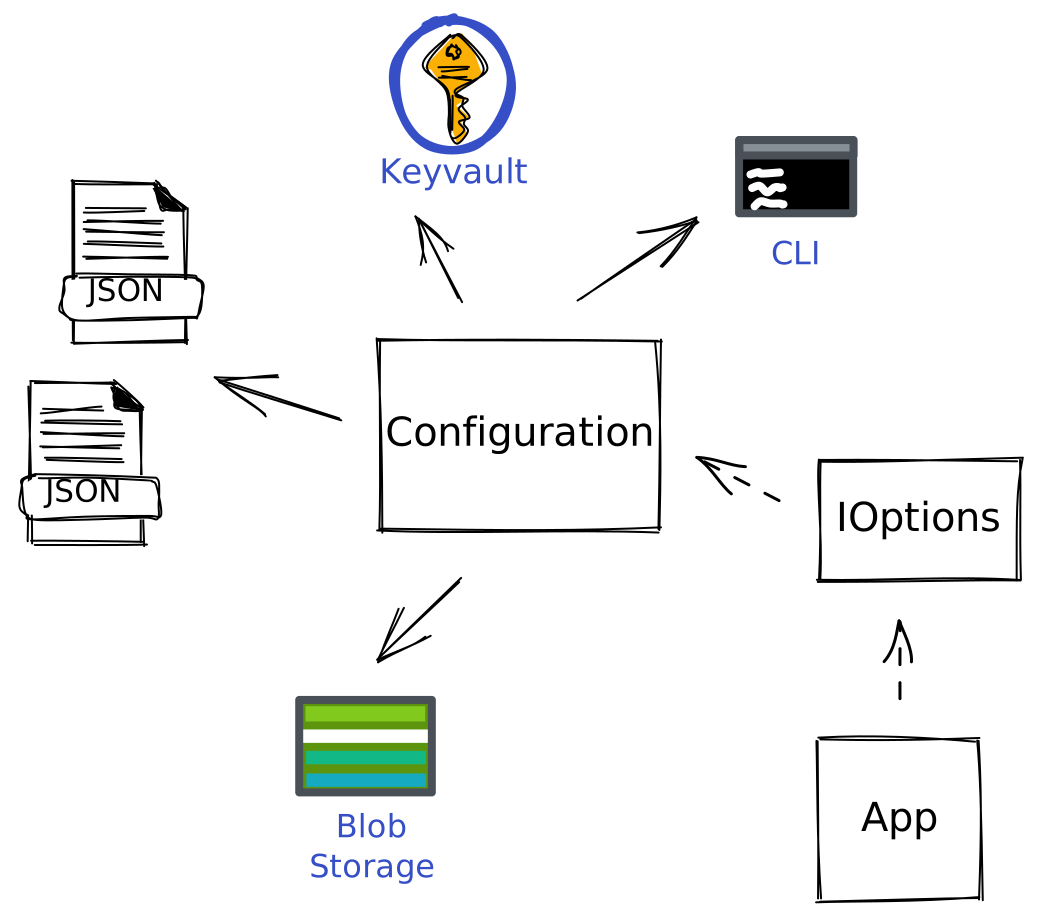
As I understand it, the configuration concept in .NET is the combination of different configuration sources, called configuration providers, resulting in a single combined configuration. In contrast, the options concept provides access to configuration from our application code. I've attempted to illustrate it with the image below.
Technically the image above is an over-simplification. In reality, you use an IConfigurationBuilder where different providers are provided, and the configuration block in the middle is the merged build-result of the configuration builder. In fact, you get a preconfigured configuration builder every time you use the ASP.NET Web templates. You get a default HostBuilder that setups an IHost. This default builder also takes care of the default configuration.
The default configuration adds in order
appsettings.json
appsettings.Environment.json
user secrets (if the environment is development)
environment variables
command-line arguments
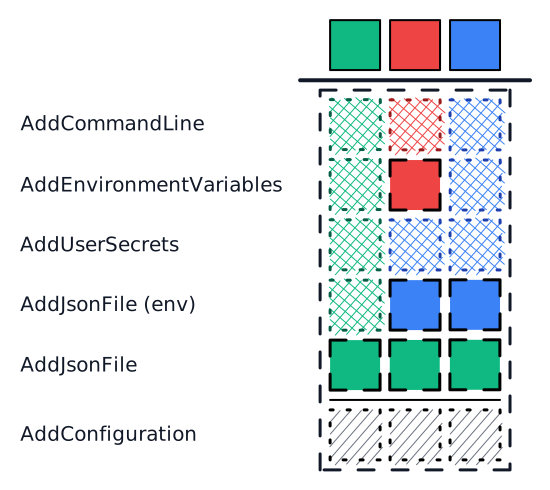
The priority of settings is in the reverse order of adding them to the builder. Passing a setting via the command line will always win from a setting in the appsettings.json file. Fun fact, there are two configurations in ASP.NET. You have the AppConfiguration we just discussed, and you have the HostConfiguration. The HostConfiguration is used to set variables like the DOTNET_ENVIRONMENT, which is used to load the proper appsettings.json and user secrets. Via means of ChainedConfiguration the entire HostConfiguration is also available as part of AppConfiguration.
Let's look at an example. Take the following JSON configuration:
That would result in the following two settings being present in our IConfiguration.
MySample:MyText
MySample:MyCollection:0:MyOtherText
With this bit of knowledge, you can override any setting in any provider you can imagine. Visually it would look something like the image below. You can provide sensible defaults in appsettings.json and overwrite values as needed.
As pointed out by the "The Twelve-Factor App" article linked previously, adding configuration files per environment does not scale. I typically end up with one appsettings.json for the defaults and an appsettings.Production.json that gets transformed in my CICD pipeline.
You can read about changes to IConfiguration in .NET6 in a post from Andrew Lock. It also contains a different visual representation of configuration, which neatly displays the merging of the different levels.
According to the Microsoft Docs the options pattern is the preferred way to read related configuration values. The options pattern comes in three different flavours, IOptions<>, IOptionsSnapshot<> and IOptionsMonitor<>. Probably the most used one is the default IOptions one, with the drawback that you cannot read configuration after your app starts. Others have taken the task upon themself to explain the differences between the interfaces, for example Andrew Lock and Khalid Abuhakmeh. For this post, I will keep it simple with the regular IOptions.
A typical registration of configuration would look like this:
public static partial class ServiceCollectionExtensions
{
    public static IServiceCollection AddDemo(this IServiceCollection services, IConfiguration configuration)
    {
        services.Configure<DemoOptions>(configuration.GetSection(DemoOptions.DefaultConfigurationSectionName));
        return services;
    }
}
This snippet requires the Microsoft Extensions Options ConfigurationExtensions package to work
Looking at our dependency injection container right after this registration, we see more than just IOptions. We have a total of seven registrations at this point.
The problem with the above approach is that it assumes the configuration exists at a predefined section, which is not very flexible. An alternative approach to register IOptions is the use of an Action<>.
public static partial class ServiceCollectionExtensions
{
    public static IServiceCollection AddExample(this IServiceCollection services, Action<ExampleOptions> configureDelegate)
    {
        services.Configure(configureDelegate);
        return services;
    }
}
With this approach, we get a total of six DI registrations.
Now that we covered the basics, I can move on to the focal point of this blog post. As you can imagine overlaying the different configuration sources does not guarantee a valid result from the point of view of your application. Worse, since the number of configuration sources can differ between environments, you can potentially have configuration issues very late in your CICD pipeline. For example, if you use Azure Key Vault as a configuration provider, settings might be changed by anyone with access to the vault.
In my article Generate C# client for OpenAPI, I used HttpClient to call a generated OpenAPI service. HTTP is the perfect example for validating configuration. In our API example, we will likely have different base URLs per environment. If we represent an URL as a string in configuration, it is feasible to enter "not-an-url" as its value, which causes your application to crash and burn.
As I see it, there are two distinct ways configuration can fail.
The first variant is binding configuration at a section that does not exist. That is because configuration.GetSection does not throw but returns null for a section that does not exist. Oddly enough, when configuration fails to bind, you still get an IOptions<TOptions> but with null values.
When specifying a section by name, I expect that section to exist. Therefore I want my application to not boot with missing configuration sections. The following extension method takes care of that.
public static IConfigurationSection GetExistingSectionOrThrow(this IConfiguration configuration, string key)
{
    var configurationSection = configuration.GetSection(key);

    if (!configurationSection.Exists())
    {
        throw configuration switch
        {
            IConfigurationRoot configurationIsRoot => new ArgumentException($"Section with key '{key}' does not exist. Existing values are: {configurationIsRoot.GetDebugView()}", nameof(key)),
            IConfigurationSection configurationIsSection => new ArgumentException($"Section with key '{key}' does not exist at '{configurationIsSection.Path}'. Expected configuration path is '{configurationSection.Path}'", nameof(key)),
            _ => new ArgumentException($"Failed to find configuration at '{configurationSection.Path}'", nameof(key))
        };
    }

    return configurationSection;
}
caution: configurationIsRoot.GetDebugView() prints all configuration settings and their value, if you have secrets you should add log masking to prevent them from being logged.
The second variant is the most likely to occur. That is, settings are present but not valid in the context of the application. I recently browsed the Microsoft Docs after (again) losing time chasing configuration issues when I came across IValidateOptions. I also rediscovered ValidateDataAnnotations on the IOptionsBuilder, which I previously dismissed since it was a different API (AddOptions<>) than the Configure<> APIs. With Resharper by my side, I checked the implementation and discovered that it uses DataAnnotationValidateOptions a class that is a IValidateOptions.
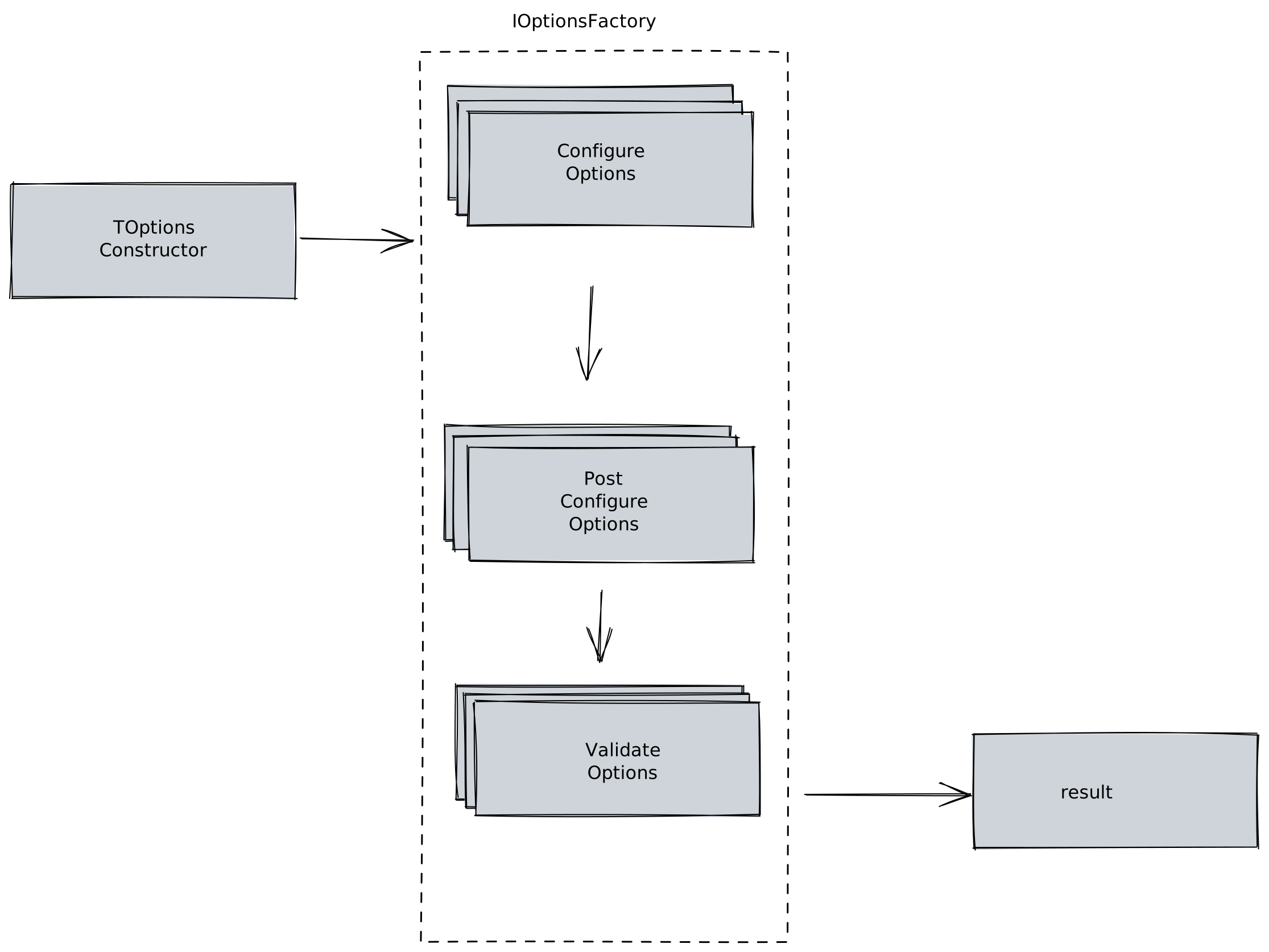
When consuming an IOptions, there are three hooks we can use. We have IConfigureOptions, IPostConfigureOptions and IValidateOptions. If you head back up to where I printed the dependency injection container, you see that every time you use Configure<>, you get an IConfigureOptions. I illustrated this process below, IOptions makes use of an OptionsFactory. This factory goes through all registered "option services".
You can add any number of implementations of these three interfaces. Implementations of the same interface execute in the order in which you define them. If you register an IPostConfigureOptions or IValidateOptions before the normal IConfigureOptions, it won't run before it. The factory runs through 0 or more IConfigureOptions, 0 or more IPostConfigureOptions and finally 0 or more IValidateOptions and always in that order.
To demonstrate how this works, consider the following example:
public class ConfigureLibraryExampleServiceOptions : IConfigureOptions<LibraryExampleServiceOptions>, IPostConfigureOptions<LibraryExampleServiceOptions>, IValidateOptions<LibraryExampleServiceOptions>
{
    private readonly ILogger _logger;

    public ConfigureLibraryExampleServiceOptions(ILogger<ConfigureLibraryExampleServiceOptions> logger)
    {
        _logger = logger;
    }

    public void Configure(LibraryExampleServiceOptions options)
    {
        _logger.LogInformation("ConfigureExampleServiceOptions Configure");
    }

    public void PostConfigure(string name, LibraryExampleServiceOptions options)
    {
        _logger.LogInformation("ConfigureExampleServiceOptions PostConfigure");
    }

    public ValidateOptionsResult Validate(string name, LibraryExampleServiceOptions options)
    {
        _logger.LogInformation("ConfigureExampleServiceOptions ValidateOptionsResult");
        return ValidateOptionsResult.Skip;
    }
}
You might assume that this validation triggers the moment we resolve an IOptions from the DI container. Unfortunately, this is not the case; it only triggers when using the .Value property.
var configuration = new ConfigurationBuilder()
    .AddInMemoryCollection(new Dictionary<string, string>() {
        [string.Join(":", LibraryExampleServiceOptions.DefaultConfigurationSectionName, nameof(LibraryExampleServiceOptions.BaseUrl))] = "http://example.com"
    })
    .Build();
var serviceProvider = new ServiceCollection()
    .AddLogging(builder => builder.AddConsole())
    .AddExampleLibrary(configuration)
    .BuildServiceProvider();

var logger = serviceProvider.GetRequiredService<ILogger<Program>>();
logger.LogInformation("Before retrieving IOptions");
var options = serviceProvider.GetRequiredService<IOptions<LibraryExampleServiceOptions>>();
logger.LogInformation("After retrieving IOptions; before IOptions.Value");
var optionsValue = options.Value;
logger.LogInformation("After IOptions.Value");

Console.ReadLine();
Which outputs:
info: Program[0]
      Before retrieving IOptions
info: Program[0]
      After retrieving IOptions; before IOptions.Value
info: Kaylumah.ValidatedStronglyTypedIOptions.Library.ConfigureLibraryExampleServiceOptions[0]
      ConfigureExampleServiceOptions Configure
info: Kaylumah.ValidatedStronglyTypedIOptions.Library.ConfigureLibraryExampleServiceOptions[0]
      ConfigureExampleServiceOptions PostConfigure
info: Kaylumah.ValidatedStronglyTypedIOptions.Library.ConfigureLibraryExampleServiceOptions[0]
      ConfigureExampleServiceOptions ValidateOptionsResult
info: Program[0]
      After IOptions.Value
Circling back to validation, I've created an extension method that registers DataAnnotationValidateOptions for us. One thing to note is that IValidateOptions is a named option, whereas the normal IOptions is an unnamed option. Microsoft solved this by providing a "DefaultName" for an options object which is an empty string.
public static partial class ServiceCollectionExtensions
{
    public static IServiceCollection ConfigureWithValidation<TOptions>(this IServiceCollection services, IConfiguration config) where TOptions : class
        => services.ConfigureWithValidation<TOptions>(Options.Options.DefaultName, config);

    public static IServiceCollection ConfigureWithValidation<TOptions>(this IServiceCollection services, string name, IConfiguration config) where TOptions : class
    {
        _ = config ?? throw new ArgumentNullException(nameof(config));
        services.Configure<TOptions>(name, config);
        services.AddDataAnnotationValidatedOptions<TOptions>(name);
        return services;
    }

    public static IServiceCollection ConfigureWithValidation<TOptions>(this IServiceCollection services, Action<TOptions> configureOptions) where TOptions : class
        => services.ConfigureWithValidation<TOptions>(Options.Options.DefaultName, configureOptions);

    public static IServiceCollection ConfigureWithValidation<TOptions>(this IServiceCollection services, string name, Action<TOptions> configureOptions) where TOptions : class
    {
        services.Configure(name, configureOptions);
        services.AddDataAnnotationValidatedOptions<TOptions>(name);
        return services;
    }

    private static IServiceCollection AddDataAnnotationValidatedOptions<TOptions>(this IServiceCollection services, string name) where TOptions : class
    {
        services.TryAddEnumerable(ServiceDescriptor.Singleton<IValidateOptions<TOptions>>(new DataAnnotationValidateOptions<TOptions>(name)));
        return services;
    }
}
If we put it to the test, our settings object could look like this. In this case, we use the Required and Url attributes. You can use any of the attributes provided by default, or create your custom attributes.
public class LibraryExampleServiceOptions
{
    public const string DefaultConfigurationSectionName = nameof(LibraryExampleServiceOptions);

    [Required, Url]
    public string? BaseUrl { get;set; }
}
Consider nullability and default values of properties when defining them. In the spirit of the example, you might have a retry-count if it has the value 0; is that because you specified it or forgot to define it? That's why I always define properties as [Required] and Nullable.
info: Program[0]
      Before retrieving IOptions
info: Program[0]
      After retrieving IOptions; before IOptions.Value
info: Kaylumah.ValidatedStronglyTypedIOptions.Library.ConfigureLibraryExampleServiceOptions[0]
      ConfigureExampleServiceOptions Configure
info: Kaylumah.ValidatedStronglyTypedIOptions.Library.ConfigureLibraryExampleServiceOptions[0]
      ConfigureExampleServiceOptions PostConfigure
info: Kaylumah.ValidatedStronglyTypedIOptions.Library.ConfigureLibraryExampleServiceOptions[0]
      ConfigureExampleServiceOptions ValidateOptionsResult
Unhandled exception. Microsoft.Extensions.Options.OptionsValidationException: DataAnnotation validation failed for 'LibraryExampleServiceOptions' members: 'BaseUrl' with the error: 'The BaseUrl field is not a valid fully-qualified http, https, or ftp URL.'.
   at Microsoft.Extensions.Options.OptionsFactory`1.Create(String name)
   at Microsoft.Extensions.Options.UnnamedOptionsManager`1.get_Value()
   at Program.<Main>$(String[] args)
I think that is pretty neat. But I am not a big fan of the formatting. I remember the last time I used the Web API template, which resulted in a nicely formatted error. I had to dig in the ASPNET code, and it's the ModelStateInvalidFilter that transforms ModelStateDictionary.cs into a ValidationProblemDetails. I've added an example of this to the source repo, with the output shown below.
{
    "type": "https://tools.ietf.org/html/rfc7231#section-6.5.1",
    "title": "One or more validation errors occurred.",
    "status": 400,
    "traceId": "00-50f5816f844377e66f37688f297dfd29-ab771434a82ee290-00",
    "errors": {
        "Name": ["The Name field is required."],
        "EmailAddresses[0].Label": ["The Label field is required."],
        "EmailAddresses[0].Address": ["The Address field is required."]
    }
}
In the example above, I added validation on both the parent and the child DTO. It appears, however, that doing the same with DataAnnotations does not work. To enable the same behaviour for DataAnnotations, we can create custom ValidationAttributes. We begin with defining a special ValidationResult that is a composite of multiple ValidationResults.
public class CompositeValidationResult : System.ComponentModel.DataAnnotations.ValidationResult
{
    private readonly List<System.ComponentModel.DataAnnotations.ValidationResult> results = new();

    public IEnumerable<System.ComponentModel.DataAnnotations.ValidationResult> Results => results;

    public CompositeValidationResult(string? errorMessage) : base(errorMessage)
    {
    }

    public CompositeValidationResult(string errorMessage, IEnumerable<string>? memberNames) : base(errorMessage, memberNames)
    {
    }

    protected CompositeValidationResult(System.ComponentModel.DataAnnotations.ValidationResult validationResult) : base(validationResult)
    {
    }

    public void AddResult(System.ComponentModel.DataAnnotations.ValidationResult validationResult)
    {
        results.Add(validationResult);
    }
}
Next we create a custom ValidationAttribute for objects.
[AttributeUsage(AttributeTargets.Property | AttributeTargets.Parameter)]
public sealed class ValidateObjectAttribute : ValidationAttribute
{
    protected override System.ComponentModel.DataAnnotations.ValidationResult IsValid(object? value, ValidationContext validationContext)
    {
        if (value != null && validationContext != null)
        {
            var results = new List<System.ComponentModel.DataAnnotations.ValidationResult>();
            var context = new ValidationContext(value, null, null);

            System.ComponentModel.DataAnnotations.Validator.TryValidateObject(value, context, results, true);

            if (results.Count != 0)
            {
                var compositeValidationResult = new CompositeValidationResult($"Validation for {validationContext.DisplayName} failed.", new[] { validationContext.MemberName });
                results.ForEach(compositeValidationResult.AddResult);

                return compositeValidationResult;
            }
        }

        return System.ComponentModel.DataAnnotations.ValidationResult.Success;
    }
}
And finally, we need a ValidationAttribute for collections.
[AttributeUsage(AttributeTargets.Property | AttributeTargets.Parameter)]
public sealed class ValidateCollectionAttribute : ValidationAttribute
{
    protected override System.ComponentModel.DataAnnotations.ValidationResult IsValid(object? value, ValidationContext validationContext)
    {
        CompositeValidationResult? collectionCompositeValidationResult = null;

        if (value is IEnumerable collection && validationContext != null)
        {
            var index = 0;
            foreach (var obj in collection)
            {
                var results = new List<System.ComponentModel.DataAnnotations.ValidationResult>();
                var context = new ValidationContext(obj, null, null);

                System.ComponentModel.DataAnnotations.Validator.TryValidateObject(obj, context, results, true);

                if (results.Count != 0)
                {
                    var compositeValidationResult = new CompositeValidationResult($"Validation for {validationContext.MemberName}[{index}] failed.", new[] { $"{validationContext.MemberName}[{index}]" });
                    results.ForEach(compositeValidationResult.AddResult);

                    if (collectionCompositeValidationResult == null)
                    {
                        collectionCompositeValidationResult = new CompositeValidationResult($"Validation for {validationContext.MemberName} failed.", new[] { validationContext.MemberName });
                    }

                    collectionCompositeValidationResult.AddResult(compositeValidationResult);
                }

                index++;
            }

            if (collectionCompositeValidationResult != null)
            {
                return collectionCompositeValidationResult;
            }
        }

        return System.ComponentModel.DataAnnotations.ValidationResult.Success;
    }
}
Our validation would already trigger with just these attributes. But we are also interested in handling our CompositeValidationResult and pretty-printing it.
public static class Validator
{
    public static ValidationResult[] ValidateReturnValue(object objectToValidate)
    {
        var validationResults = new List<System.ComponentModel.DataAnnotations.ValidationResult>();

        if (objectToValidate == null)
        {
            validationResults.Add(new System.ComponentModel.DataAnnotations.ValidationResult("Return value is required."));
        }
        else
        {
            var validationContext = new ValidationContext(objectToValidate);

            System.ComponentModel.DataAnnotations.Validator.TryValidateObject(objectToValidate, validationContext, validationResults, true);

            if (validationResults.Count != 0)
            {
                var compositeValidationResult = new CompositeValidationResult($"Validation for {validationContext.DisplayName} failed.", new[] { validationContext.MemberName });
                validationResults.ForEach(compositeValidationResult.AddResult);
            }
        }

        var structuredValidationResults = StructureValidationResults(validationResults);
        return structuredValidationResults;
    }

    private static ValidationResult[] StructureValidationResults(IEnumerable<System.ComponentModel.DataAnnotations.ValidationResult> validationResults)
    {
        var structuredValidationResults = new List<ValidationResult>();
        foreach (var validationResult in validationResults)
        {
            var structuredValidationResult = new ValidationResult
            {
                ErrorMessage = validationResult.ErrorMessage,
                MemberNames = validationResult.MemberNames.ToArray()
            };

            if (validationResult is CompositeValidationResult compositeValidationResult)
            {
                structuredValidationResult.ValidationResults = StructureValidationResults(compositeValidationResult.Results);
            }

            structuredValidationResults.Add(structuredValidationResult);
        }

        return structuredValidationResults.ToArray();
    }
}
You can then use it in an IValidateOptions like this
internal class CustomValidate : IValidateOptions<NestedParent>
{
    public ValidateOptionsResult Validate(string name, NestedParent options)
    {
        var validationResults = Kaylumah.ValidatedStronglyTypedIOptions.Utilities.Validation.Validator.ValidateReturnValue(options);
        if (validationResults.Any())
        {
            var builder = new StringBuilder();
            foreach (var result in validationResults)
            {
                var pretty = PrettyPrint(result, string.Empty, true);
                builder.Append(pretty);
            }
            return ValidateOptionsResult.Fail(builder.ToString());
        }

        return ValidateOptionsResult.Success;
    }

    private string PrettyPrint(Kaylumah.ValidatedStronglyTypedIOptions.Utilities.Validation.ValidationResult root, string indent, bool last)
    {
        // Based on https://stackoverflow.com/a/1649223
        var sb = new StringBuilder();
        sb.Append(indent);
        if (last)
        {
            sb.Append("|-");
            indent += "  ";
        }
        else
        {
            sb.Append("|-");
            indent += "| ";
        }

        sb.AppendLine(root.ToString());

        if (root.ValidationResults != null)
        {
            for (var i = 0; i < root.ValidationResults.Length; i++)
            {
                var child = root.ValidationResults[i];
                var pretty = PrettyPrint(child, indent, i == root.ValidationResults.Length - 1);
                sb.Append(pretty);
            }
        }

        return sb.ToString();
    }
}
Which prints
Microsoft.Extensions.Options.OptionsValidationException : |-Children => Validation for Children failed.
  |-Children[0] => Validation for Children[0] failed.
    |-Name => The Name field is required.

    Stack Trace:
       at Microsoft.Extensions.Options.OptionsFactory`1.Create(String name)
   at Microsoft.Extensions.Options.UnnamedOptionsManager`1.get_Value()
That looks more like it. One thing this approach, unfortunately, cannot solve is that errors occur at runtime. Wherewith IConfiguration, we could get the error at startup; we don't have the same luxury with IOptions since, as demonstrated, Value triggers at runtime. It is, however, a step in the right direction.
Note: since IOptions<> is an unbound generic you cannot retrieve all instances of it from the DI container to trigger this behaviour at startup
I never liked using IOptions<> all over the place. I've found it especially bothersome in unit tests. I would either need Options.Create or create an IOptions Moq. If you don't rely on reloading configuration (remember IOptions is a Singleton), you can register a typed instance, which I find pretty neat.
var serviceProvider = new ServiceCollection()
            .Configure<StronglyTypedOptions>(builder => {
                builder.Name = "TestStronglyTypedOptions";
            })
            .AddSingleton(sp => sp.GetRequiredService<IOptions<StronglyTypedOptions>>().Value)
            .BuildServiceProvider();
var options = serviceProvider.GetRequiredService<IOptions<StronglyTypedOptions>>().Value;
var typedOptions = serviceProvider.GetRequiredService<StronglyTypedOptions>();
typedOptions.Name.Should().Be(options.Name);
Using the options and configuration patterns described in this article makes it a lot less likely to run into configuration errors, or at the very least, it makes it easier to troubleshoot configuration mistakes.
As always, if you have any questions, feel free to reach out. Do you have suggestions or alternatives? I would love to hear about them.
The corresponding source code for this article is on GitHub.
See you next time, stay healthy and happy coding to all 🧸!
]]>https://kaylumah.nl/2021/11/14/capture-logs-in-unit-tests.html<![CDATA[Capture Logs in Unit Tests]]>2021-11-14T20:30:00+01:002021-11-14T20:30:00+01:00Max Hamulyákmax@kaylumah.nlIn application code, we are used to writing log statements primarily for diagnostic purposes. For instance, we use logs to capture unexpected error flows. Therefore it is not uncommon to want to capture the log output in our unit tests. You have three distinctive options to handle log output in unit tests, as far as I can tell.
Our test scenario is a service or system under test (SUT) that takes a string input and returns it without modification. We rely on Microsoft Extensions for our logging purposes. As the test framework, we will be using Xunit.
public interface IEchoService
{
    Task<string> Echo(string input);
}
The initial implementation of our SUT could look like this:
public class EchoService : IEchoService
{
    private readonly ILogger<EchoService> _logger;

    public EchoService(ILogger<EchoService> logger)
    {
        _logger = logger;
    }

    public Task<string> Echo(string input)
    {
        _logger.LogInformation("echo was invoked");
        return Task.FromResult(input);
    }
}
For this article, the snippet above would be more than sufficient. But in a real-life application, I prefer to log the input as well. If, however, we would use simple string interpolation, we immediately get a Code-Analysis warning about it. The recommendation here is to use LoggerMessage that enables the use of high-performance logging. I've always found that implementing the LoggerMessage pattern required quite a bit of boilerplate. Luckily in .NET 6, this is a lot easier. We can generate all the boilerplate we need. As per usual, Andrew Lock wrote a piece about this new feature already.
After applying our LoggerMessage changes to the SUT it looks like the snippet below. Please note that in order for this to work the class EchoService it self is now marked as partial.
public partial class EchoService : IEchoService
{
    private readonly ILogger<EchoService> _logger;

    public EchoService(ILogger<EchoService> logger)
    {
        _logger = logger;
    }

    public Task<string> Echo(string input)
    {
        //_logger.LogInformation("echo was invoked");

        // The logging message template should not vary between calls to ... csharp(CA2254)
        // _logger.LogInformation($"echo was invoked with {input}");

        LogEchoCall(input);

        return Task.FromResult(input);
    }

    [LoggerMessage(1000, LogLevel.Information, "echo was invoked '{EchoInput}'")]
    partial void LogEchoCall(string echoInput);
}
First up is doing absolutely nothing. Yeah, you read that correctly. You might find it silly to start this piece with the first option being nothing, but doing nothing with log statements in your test code is perfectly fine. Heck, even doing nothing comes in two flavours.
If we use Dependency Injection in our test, we have access to "AddLogging()". If we don't provide a logging provider, our code will run just fine. Otherwise, if you have already set up a logging provider or provided one explicitly, it will log to zero or more providers depending on your current configuration. For instance, you could use the ConsoleLoggerProvider to log to the console during the test. I often use the DI variant in my test since I am writing extension methods on IServiceCollection to write up my code anyway, so using the same extension method in test code simplifies matters.
[Fact]
public async Task Test_DependencyInjection_EmptyLoggingBuilder()
{
    var configuration = new ConfigurationBuilder().Build();
    var serviceProvider = new ServiceCollection()
        .AddLogging() // could also be part of AddEcho to make sure ILogger is available outside ASP.NET runtime
        .AddEcho(configuration)
        .BuildServiceProvider();
    var sut = serviceProvider.GetRequiredService<IEchoService>();
    var testInput = "Scenario: empty logging builder";
    var testResult = await sut.Echo(testInput).ConfigureAwait(false);
    testResult.Should().Be(testInput, "the input should have been returned");
}
[Fact]
public async Task Test_DependencyInjection_ConsoleLoggingBuilder()
{
    var configuration = new ConfigurationBuilder().Build();
    var serviceProvider = new ServiceCollection()
        .AddLogging(loggingBuilder => {
            loggingBuilder.AddConsole();
        })
        .AddEcho(configuration)
        .BuildServiceProvider();
    var sut = serviceProvider.GetRequiredService<IEchoService>();
    var testInput = "Scenario: console logging builder";
    var testResult = await sut.Echo(testInput).ConfigureAwait(false);
    testResult.Should().Be(testInput, "the input should have been returned");
}
If, however, you cannot rely on dependency injection in your tests, you have the alternative of manual creating your SUT and relevant dependencies. The only dependency of our EchoService is an instance of ILogger. For testing purposes, you can use the NullLoggerFactory, which creates a logger that logs into the void.
[Fact]
public async Task Test_Manuel_NullLoggingFactory()
{
    var sut = new EchoService(NullLogger<EchoService>.Instance);
    var testInput = "Scenario: null logger factory";
    var testResult = await sut.Echo(testInput).ConfigureAwait(false);
    testResult.Should().Be(testInput, "the input should have been returned");
}
As you can see in the screenshot above, and empty logger and a NullLogger are not the same thing.
The second method uses the Moq framework, which makes it possible to hide the logger behind a Mock, which means it's a fake version of ILogger. In my previous article, "Adventures with Mock", I touched upon my preferred method of writing mocks. I even included an initial version of the LoggerMock. Since then, I have fleshed out the concept more, so here is an updated version of the Logger Mock.
public class LoggerMock<TCategoryName> : Mock<ILogger<TCategoryName>>
{
    private readonly List<LogMessage> logMessages = new();

    public ReadOnlyCollection<LogMessage> LogMessages => new(logMessages);

    protected LoggerMock()
    {
    }

    public static LoggerMock<TCategoryName> CreateDefault()
    {
        return new LoggerMock<TCategoryName>()
            .SetupLog()
            .SetupIsEnabled(LogLevel.Information);
    }

    public LoggerMock<TCategoryName> SetupIsEnabled(LogLevel logLevel, bool enabled = true)
    {
        Setup(x => x.IsEnabled(It.Is<LogLevel>(p => p.Equals(logLevel))))
            .Returns(enabled);
        return this;
    }

    public LoggerMock<TCategoryName> SetupLog()
    {
        Setup(logger => logger.Log(
            It.IsAny<LogLevel>(),
            It.IsAny<EventId>(),
            It.Is<It.IsAnyType>((v, t) => true),
            It.IsAny<Exception>(),
            It.Is<Func<It.IsAnyType, Exception?, string>>((v, t) => true)
        ))
        .Callback(new InvocationAction(invocation => {
            var logLevel = (LogLevel)invocation.Arguments[0];
            var eventId = (EventId)invocation.Arguments[1];
            var state = invocation.Arguments[2];
            var exception = (Exception?)invocation.Arguments[3];
            var formatter = invocation.Arguments[4];

            var invokeMethod = formatter.GetType().GetMethod("Invoke");
            var actualMessage = (string?)invokeMethod?.Invoke(formatter, new[] { state, exception });

            logMessages.Add(new LogMessage {
                EventId = eventId,
                LogLevel = logLevel,
                Message = actualMessage,
                Exception = exception,
                State = state
            });
        }));
        return this;
    }
}
Any Mock created with Moq will provide you with the ability to assert invocations made to the mocked class. Since my approach makes the mock stateful, I can capture any request made against it. We can make concrete assertions because we can access information like EventId and LogLevel. If, for instance, you have alerts written against business events, you want to validate that the correct information passes into your logging system.
[Fact]
public async Task Test_Moq_DefaultMockedLogger()
{
    var loggerMock = LoggerMock<EchoService>.CreateDefault();
    var sut = new EchoService(loggerMock.Object);
    var testInput = "Scenario: mocked logger";
    var testResult = await sut.Echo(testInput).ConfigureAwait(false);
    testResult.Should().Be(testInput, "the input should have been returned");

    loggerMock.LogMessages.Should().NotBeEmpty().And.HaveCount(1);
    loggerMock.VerifyEventWasLogged(new EventId(1000));
}

[Fact]
public async Task Test_Moq_LogLevelDisabledMockedLogger()
{
    var loggerMock = LoggerMock<EchoService>.CreateDefault().SetupIsEnabled(LogLevel.Information, enabled: false);
    var sut = new EchoService(loggerMock.Object);
    var testInput = "Scenario: log level disabled mocked logger";
    var testResult = await sut.Echo(testInput).ConfigureAwait(false);
    testResult.Should().Be(testInput, "the input should have been returned");

    loggerMock.LogMessages.Should().BeEmpty();
}
Thus far, we have discussed options that would work outside Xunit. The third technique is not limited to Xunit, but its implementation is restricted to use in a Xunit project because we will now rely on Xunit's ITestOutputHelper mechanism. In most cases, we would use ITestOutputHelper to log lines inside the test case itself; it is, however, possible to create an ILogger that writes to ITestOutputHelper so we can also capture logs our SUT produces.
Microsoft has well-written documentation on how to create a custom logger provider. We start with a configuration class for our XunitLogger. We will have no custom settings in this demo, but putting the configuration in place makes it easier to add settings later. The ConsoleLogger, for example, uses configuration to control LogScope inclusion and timestamp formats.
public class XunitLoggerConfiguration
{
}
Next up is our Xunit logger itself. The ColoredConsole sample from the docs does nothing with scope, but to not limit ourselves later, we changed the implementation of BeginScope to use IExternalScopeProvider. To print the log line, we need the last argument of Log<TState>, which is the formatter. We then pass it the Xunit's ITestOutputHelper to capture output. Depending on your specific needs, you can log the logger's category (name), event, log level, scope or even exception. For now, let's keep it simple.
An ILoggerProvider is responsible for creating ILogger instances; this means we also need the custom XunitLoggerProvider to take care of making our XunitLogger.
public sealed class XunitLoggerProvider : ILoggerProvider
{
    private readonly IDisposable _configurationOnChangeToken;
    private XunitLoggerConfiguration _currentConfiguration;
    private readonly ConcurrentDictionary<string, XunitLogger> _loggers = new();
    private readonly IExternalScopeProvider _externalScopeProvider = new LoggerExternalScopeProvider();
    private readonly ITestOutputHelper _testOutputHelper;

    public XunitLoggerProvider(IOptionsMonitor<XunitLoggerConfiguration> optionsMonitor, ITestOutputHelper testOutputHelper)
    {
        _currentConfiguration = optionsMonitor.CurrentValue;
        _configurationOnChangeToken = optionsMonitor.OnChange(updatedConfiguration => _currentConfiguration = updatedConfiguration);
        _testOutputHelper = testOutputHelper;
    }

    public ILogger CreateLogger(string categoryName)
    {
        var logger = _loggers.GetOrAdd(categoryName, name => new XunitLogger(name, GetCurrentConfiguration, _externalScopeProvider, _testOutputHelper));
        return logger;
    }

    public void Dispose()
    {
        _loggers.Clear();
        _configurationOnChangeToken.Dispose();
    }

    private XunitLoggerConfiguration GetCurrentConfiguration() => _currentConfiguration;
}
The final puzzle piece is an extension method that allows us to register the new logger type. Note that we also add ITestOutputHelper to the DI container of the LoggingBuilder; that is why the XunitLoggingProvider in the previous snippet can retrieve it from the dependency injection container.
The usage is the same as the ConsoleLogger example we did previously.
[Fact]
public async Task Test_Custom_XunitLoggingBuilder()
{
    var configuration = new ConfigurationBuilder().Build();
    var serviceProvider = new ServiceCollection()
        .AddLogging(loggingBuilder => {
            loggingBuilder.AddXunit(_testOutputHelper);
        })
        .AddEcho(configuration)
        .BuildServiceProvider();
    var sut = serviceProvider.GetRequiredService<IEchoService>();
    var testInput = "Scenario: custom logging builder";
    var testResult = await sut.Echo(testInput).ConfigureAwait(false);
    testResult.Should().Be(testInput, "the input should have been returned");
}
The first time I ran this test, I was baffled. I could only see the console output from ConsoleLogger test we did previously. A quick google search brought me to the solution. We need to tell the dotnet test runner to display it with dotnet test --logger:"console;verbosity=detailed". Telling an entire team they can no longer simply run dotnet test was not a real solution; luckily, we can simplify things with dotnet test --settings runsettings.xml.
However, explicitly passing --settings every time does not solve anything. On the Microsoft Docs I found the solution. We can tell MSBuild to use RunSettingsFilePath, which takes care of it for us. If we now run dotnet test we get proper output. For example, you can add a Directory.Build.props to the root of your project.
I know I am not the first to write about this topic, but I hope to provide fresh insight into the subject matter. The different techniques all have their merit. I have used all three on other occasions and remind you that the NullLogger is a viable option in many cases. Nine times out of 10, you probably only care about the business logic to test. For the final remaining time, I can only say the well-known programming wisdom: "It depends".
As always, if you have any questions, feel free to reach out. Do you have suggestions or alternatives? I would love to hear about them.
The corresponding source code for this article is on GitHub.
See you next time, stay healthy and happy coding to all 🧸!
]]>https://kaylumah.nl/2021/07/17/decreasing-solution-build-time-with-filters.html<![CDATA[Decreasing Solution Build time with Filters]]>2021-07-17T00:00:00+02:002021-07-17T00:00:00+02:00Max Hamulyákmax@kaylumah.nlThere are many ways to structure your projects source code. My preference is a style called single-solution-model. Amongst other things, I like that it provides a single entry point to my project. If, however, your project grows, it can become slow to build it. I am sure some of you will be familiar with the following xkcd joke or some variant of it:
The next version of Visual Studio will come with a lot of promised performance improvements. VisualStudio 2022 is the first version that takes advantage of the 64-bit processor architecture. I have not yet tested it, but I am hopeful for a more performant experience developing when it ships.
While I think the 1600+ projects in a solution demo are cool, I would not see myself using the single solution model at that scale.
That brings me to the topic of today's post. I recently discovered a VS2019 feature I did not know that can bring some improvement to my experience. VS2019 introduced a new feature called solution filters. I googled a bit against it and did not find a lot about it, except for the Microsoft Docs itself. So I wrote this post to help raise awareness for something I found very useful.
I think over my past couple of posts, it's become clear that I am a fan of the Microsoft.Extensions repository. While Microsoft uses multiple solution files throughout the repository, I would opt for the single solution model.
Many of the projects in the repo follow this pattern:
Concept.Abstractions provides interfaces
.Concept provides default implementation for Concept.Abstractions
Concept.Concrete technology specific implementation for Concept.Abstractions
After following these steps, our project should look like the picture below in Visual Studio.
We can select one or more projects at a time and unload them from the solution.
Up until now, this is how I would have done things. Just unload projects I won't need and don't worry about them anymore. What I did not know is that we save the current state of the solution.
Unloading projects manually to create filters can be error-prone. Since a solution filter only builds the projects selected by the filter missing a project causes the build to fail.
An alternative can be to unload all projects, select the project you want, and use the "reload with dependencies" option.
Like before, we can save the solution filter with the Save As Solution Filter option. The only difference is that we now get 4/7 projects as opposed to 5/7 projects. That's because we loaded the ConcreteBravo.Tests projects and it's dependencies. Even though that loads Extensions.Concept it does not load Extensions.Concept.Tests since it is not a dependency of ConcreteBravo.Tests.
While researching something unrelated to this post, I noticed that the EF Core team used this feature I did not know existed. The cool thing was that they also had a filter for all projects. So I had to try that out, and as it turns out, you can create a filter without unloading projects.
The image below shows the difference between the three filters we created. It looks exactly like a traditional Solution Explorer with the addition that the name of the filter applied is displayed.
For example, the SlnFilter.Alpha.slnf I created for Concept.ConcreteAlpha implementation looks like this:
You might be wondering what happens when I need to add new projects to my solution?
To demonstrate, let us assume our test projects have a shared helper project. At this time, I want to update our "Concept.Bravo" solution filter. This time I don't want to use dotnet CLI but use Add existing project.
You cannot use dotnet sln add on slnf files, but you can use them with dotnet build
As soon as you did this, you get this pop-up stating a mismatch between the loaded projects and the project specified in the filter.
If you followed the steps in a GIT environment, you would see that even before pressing Update Solution Filter the underlying solution is already updated.
I discussed this feature at work as a potential workaround for an issue we had in structuring our projects. One of my colleagues remembered looking at it about a year ago and finding it lacking. A few minutes later, he found a post on the developer community for Visual Studio. Funnily enough, it's a small world; the user-post links to a GitHub issue he created in this matter.
The problem is the management of multiple solutions filters because the filters are inclusive with relative paths following the sln-filter location. A proposed improvement would be to use glob patterns to include/exclude projects. That would make it easier when following naming conventions to have always up-to-date filters.
At a customer I work for, they use PowerShell as their script platform of choice, so I needed a deeper understanding of PowerShell. With PowerShell, it's reasonably easy to work with the file system and convert from and to JSON. So I thought, how hard can it be to script this.
The following script loads the paths of all *.csproj present in the solution directory and filters them out by RegEx. It then writes it to disk in the .slnf-format.
I like this new feature as a way to manage my larger solutions. Of course, it's not practical to maintain my (very basic) script for this. It will be a huge help if you think this is a valuable feature to upvote the Visual Studio Community forum issue.
As always, if you have any questions, feel free to reach out. Do you have suggestions or alternatives? I would love to hear about them.
The corresponding source code for this article is on GitHub.
See you next time, stay healthy and happy coding to all 🧸!
]]>https://kaylumah.nl/2021/05/23/generate-csharp-client-for-openapi.html<![CDATA[Generate C# client for OpenAPI]]>2021-05-23T00:00:00+02:002021-05-23T00:00:00+02:00Max Hamulyákmax@kaylumah.nl
note: on 2023-04-14 I published a revised version of this article which you can find here "Generate C# client for OpenAPI - Revisited" it compares an alternative to the way described in this article. Including an update to net7.0, but if you are looking specifically for configuring NSwag you can use this article for the general idea :)
I've recently worked on a project where I was the consumer of a third party API. Luckily for me, we decided on an Open API specification which made integrating services a breeze. If you have been following my content, you know I often use C# in my projects. So I needed a type-safe client for use in my C# code base.
To accomplish my goals, I used the NSwag library created by Rico Suter. This project provides me with an MSBuild task for generating clients. In my case, I used a JSON file version to generate my client. NSwag is not limited to just one way of working.
First, a quick recap of what is an OpenAPI. According to the official definition:
The OpenAPI Specification (OAS) defines a standard, language-agnostic interface to RESTful APIs which allows both humans and computers to discover and understand the capabilities of the service without access to source code, documentation, or through network traffic inspection. When properly defined, a consumer can understand and interact with the remote service with a minimal amount of implementation logic.
An OpenAPI definition can then be used by documentation generation tools to display the API, code generation tools to generate servers and clients in various programming languages, testing tools, and many other use cases.
That's pretty cool. Also, if you are wondering about the difference between OpenAPI / Swagger, Swagger is part of the OpenAPI initiative since 2015. But in short OpenAPI = specification, Swagger = Tooling. In this article, I am not going into much detail in setting up your API, but Microsoft described three versions on how to combine it with .NET Core.
The first version uses a file to generate our code. In our case, we will use a JSON file from the PetStore example project as provided by the swagger team.
Safe the pet store OpenAPI JSON in the project we just created under the name swagger.json. We also need a nswag.json file with the following contents:
After building the project, we have a file named Client.g.cs containing everything we need to consume the PetStore API. We can use a console application to verify that we can make API calls.
dotnet new console --framework netcoreapp3.1 --output src/Client/ApiClient --name Kaylumah.GenerateCSharpClientForOpenAPI.Client.ApiClient
An example call we can make with our API looks like this:
using System;
using System.Net.Http;
using System.Threading.Tasks;

namespace Kaylumah.GenerateCSharpClientForOpenAPI.Client.ApiClient
{
    class Program
    {
        static async Task Main(string[] args)
        {
            var httpClient = new HttpClient();
            var apiClient = new MyNamespace.Client(httpClient);
            var result = await apiClient.GetInventoryAsync();
            Console.WriteLine(string.Join("|", result.Keys));
        }
    }
}
We have established that we have a working C# client for the PetStore API. Let us look at the generated result. We got DTO's for every definition in the definitions part of the specification. We also got a class named Client with methods as GetInventoryAsync. All the generated code in Client.g.cs is part of the namespace MyNamespace; this is not helpful if I wanted to create a project with many API clients.
Two things influence the generated code. First, how you specify your fields has the most influence. For example, are your fields required, are they nullable and which kind of values are allowed. You cannot always influence this as sometimes you consume an external API; such is the case with our PetStore implementation. Luckily we can control the output by tuning values in our NSwag configuration. An eagle-eyed reader will have noticed that we are already doing this. Our nswag.json is responsible for the result. In this case, we are using the output variable to control the generated file's name.
We control the output by using an NSwag configuration document usually called *.nswag or nswag.json. It can be generated via NSwagStudio or manually. Over at the NSwag Wiki you can read all about it. It's outside of the scope of this article to go into all options, so I will demonstrate a couple of changes I like to make in my projects.
Note: You can generate a nswag configuration file by running <Exec Command="$(NSwagExe_Core31) new" />.
I encourage you to take a look at the documentation to see all configuration options. Some options apply to every generator, and some only to C# clients. See the table below for links to every section. Every section describes the options and default values if applicable.
If you look closely at your build log, you see the following line Executing file 'nswag.json' with variables ''.... So how do we pass variables to NSwag? Update the statement to "$(NSwagExe_Core31) run nswag.json /variables:Configuration=$(Configuration)" . Here we define a variable named Configuration and assign it the MSBuild value for $(Configuration). If we build our project, the logline reads Executing file 'nswag.json' with variables 'Configuration=Debug'.... You also have the option to supply default values in your NSwag configuration. This way, you don't see it as part of your build log, but it helps omit parts from the command.
Property
Description
namespace and contractsNamespace
Control the namespace of the generated code
generateContractsOutput and contractsOutputFilePath
Control seperation of contract and implementation
generateClientInterfaces
create an interface
exceptionClass and className
control classnames
operationGenerationMode
how to create client for multiple endpoints
After our modifications, our NSwag file looks like this.
To pass all the values to NSwag, we update our csproj file to look like this. For demonstration purposes, I show that the name of the MSBuild variable does not need to match the NSwag variable. Do take care that the variable names passed to NSwag need to match the name in nswag.json
Our second version generates the SDK based on a .NET Core API project in our solution, which can be very useful if you want to provide the client in a NuGet package to other projects/teams in your organization. The project setup will be almost identical to our file-based setup.
If we are going to create an SDK we first need to generate our API project. We generate a webapi with the following command:
dotnet new webapi --framework netcoreapp3.1 --output src/Apis/Nswag/WeatherForecastApi --name Kaylumah.GenerateCSharpClientForOpenAPI.Apis.Nswag.WeatherForecastApi
Note that I am specifying the optional --framework option for creating the projects; this has two reasons. First, I prefer to use LTS versions of the Microsoft SDK and secondly, Microsoft made changes to the webapi template in the NET5 SDK that makes it opt-out to use OpenAPI and defaults to Swashbuckle, which I don't want in this case.
Like before, we need a GenerateSdk target; the difference is that we don't have a swagger.json.
<Target Name="GenerateSdk" BeforeTargets="Build">
<PropertyGroup>
    <NSwagConfiguration>nswag.json</NSwagConfiguration>

    <SdkNamespace>$(RootNamespace)</SdkNamespace>
    <SdkName>Weather</SdkName>
    <GeneratedInterfaceFile>$(SdkName).Interface.g.cs</GeneratedInterfaceFile>
    <GeneratedServiceFile>$(SdkName).Service.g.cs</GeneratedServiceFile>

</PropertyGroup>
<Error Text="The NSwag configuration '$(NSwagConfiguration)' does not exists!" Condition="!Exists('$(NSwagConfiguration)')" />
<Exec Command="$(NSwagExe_Core31) run $(NSwagConfiguration) /variables:Configuration=$(Configuration),SdkName=$(SdkName),SdkNamespace=$(SdkNamespace),GeneratedClientFile=$(GeneratedServiceFile),GeneratedContractFile=$(GeneratedInterfaceFile)" />
</Target>
If we try to build our project now, we get an error.
Microsoft (R) Build Engine version 16.9.0+57a23d249 for .NET
Copyright (C) Microsoft Corporation. All rights reserved.

  Determining projects to restore...
  All projects are up-to-date for restore.
  NSwag command line tool for .NET Core NetCore31, toolchain v13.11.1.0 (NJsonSchema v10.4.3.0 (Newtonsoft.Json v12.0.0.0))
  Visit http://NSwag.org for more information.
  NSwag bin directory: /Users/maxhamulyak/.nuget/packages/nswag.msbuild/13.11.1/tools/NetCore31

  Executing file 'nswag.json' with variables 'Configuration=Debug'...
  Launcher directory: /Users/maxhamulyak/.nuget/packages/nswag.msbuild/13.11.1/tools/NetCore31
  System.Reflection.TargetInvocationException: Exception has been thrown by the target of an invocation.
   ---> System.InvalidOperationException: No service for type 'NSwag.Generation.IOpenApiDocumentGenerator' has been registered.
The reason behind this error is that the tool requires NSwag in the API project. To do this, we need to install the NSwag.AspNetCore package with dotnet add package NSwag.AspNetCore. The scope of this tutorial is not how to set up an API project with NSwag luckily, the guide is straightforward. We modify the ConfigureServices method in Startup.cs with services.AddOpenApiDocument(); and we add app.UseOpenApi(); and app.UseSwaggerUi3(); to the Configure method. We have an Open API specification for our WeatherForecast controller with these changes and can easily view and test it with Swagger UI.
Now we can successfully generate a client for the WeatherForecastAPI!
The third and final version I will look at is a combination of both previous versions. I already hinted at it in the last section, but Microsoft made some changes to the template to generate them by default using Swashbuckle.
dotnet new webapi --framework netcoreapp3.1 --output src/Apis/Swashbuckle/WeatherForecastApi --name Kaylumah.GenerateCSharpClientForOpenAPI.Apis.Swashbuckle.WeatherForecastApi
Of course, we could launch the API project and browse to https://localhost:5001/swagger and download the specification from there. But I will opt for automating the process with a CLI provided as a dotnet tool by Swashbuckle.
Since we are using netcoreapp3.1 we can make use of a local tool manifest.
dotnet new tool-manifest
dotnet tool install --version 6.1.4 Swashbuckle.AspNetCore.Cli
This allows us to run
swagger tofile --output [output] [startupassembly] [swaggerdoc]`. For example, in the FromSwashbuckleApi folder we would run `dotnet swagger tofile --output swagger.json ../../Apis/Swashbuckle/WeatherForecastApi/bin/Debug/netcoreapp3.1/Kaylumah.GenerateCSharpClientForOpenAPI.Apis.Swashbuckle.WeatherForecastApi.dll v1
At the moment, this returns an error if you target a netcoreapp3.1 project when using a net5 SDK. This issue describes a change in 6.x of the tool. A workaround for this is using a global.json file.
Now that we generated a second version of our Weather API, let's quickly compare the two.
// Swashbuckle
[System.CodeDom.Compiler.GeneratedCode("NSwag", "13.11.1.0 (NJsonSchema v10.4.3.0 (Newtonsoft.Json v12.0.0.0))")]
public partial interface IWeatherClient
{
    /// <returns>Success</returns>
    /// <exception cref="WeatherApiException">A server side error occurred.</exception>
    System.Threading.Tasks.Task<System.Collections.Generic.ICollection<WeatherForecast>> WeatherForecastAsync();

    /// <param name="cancellationToken">A cancellation token that can be used by other objects or threads to receive notice of cancellation.</param>
    /// <returns>Success</returns>
    /// <exception cref="WeatherApiException">A server side error occurred.</exception>
    System.Threading.Tasks.Task<System.Collections.Generic.ICollection<WeatherForecast>> WeatherForecastAsync(System.Threading.CancellationToken cancellationToken);

}

// NSwag
[System.CodeDom.Compiler.GeneratedCode("NSwag", "13.11.1.0 (NJsonSchema v10.4.3.0 (Newtonsoft.Json v12.0.0.0))")]
public partial interface IWeatherClient
{
    /// <exception cref="WeatherApiException">A server side error occurred.</exception>
    System.Threading.Tasks.Task<System.Collections.Generic.ICollection<WeatherForecast>> WeatherForecast_GetAsync();

    /// <param name="cancellationToken">A cancellation token that can be used by other objects or threads to receive notice of cancellation.</param>
    /// <exception cref="WeatherApiException">A server side error occurred.</exception>
    System.Threading.Tasks.Task<System.Collections.Generic.ICollection<WeatherForecast>> WeatherForecast_GetAsync(System.Threading.CancellationToken cancellationToken);

}
Funnily enough, even in a specification as small as these, there can already be differences!
As we have seen, there are multiple ways to generate a client by using NSwag.MSBuild.
If I am writing an OpenAPI specification, I prefer the syntax of Swashbuckle for several things like API versioning. That, of course, is a personal preference, but since Microsoft now also offers Swashbuckle as a default, it is nice to know we can make Swashbuckle and NSwag play nice together. How I configure my API with OpenAPI, API Versioning, ProblemDetails will be part of a future blog post.
So, where do we go from here? I did not mention it in the article, but in every generated client, we need to inject System.Net.HttpClient, which means we can combine it with HttpClientFactory and all the options it provides. Alas, that is also a topic for another day.
As always, if you have any questions, feel free to reach out. Do you have suggestions or alternatives? I would love to hear about them.
The corresponding source code for this article is on GitHub.
See you next time, stay healthy and happy coding to all 🧸!
]]>https://kaylumah.nl/2021/04/11/an-approach-to-writing-mocks.html<![CDATA[Experiment with Moq, an approach to writing mocks]]>2021-04-11T00:00:00+02:002021-04-11T00:00:00+02:00Max Hamulyákmax@kaylumah.nlRecently I was looking into a new way to use mocks in my unit tests. My framework of choice to write unit tests is XUnit, whereas I use Moq to create Mocks. The theory behind Moq will still apply if you use a different testing framework, and perhaps some of the things I will demonstrate will be possible in other mocking frameworks.
In many projects, I find that we look at essential things like:
How should the architecture look?
Which design patterns should we use?
Making sure we follow the SOLID principles.
How should we structure our code base?
At the same time, I find that we do not give our tests the same amount of love.
Wouter Roos, a colleague of mine over at ilionx, gave me this idea, and after experimenting a bit with it, I like it so much that I decided to blog about it. I tried hard to find other articles about it but did not find a post doing something similar. It wanted to make sure that the idea would also transfer to other aspects like how to mock ILogger<T>, that I stumbled upon an excellent article by Adam Storr. Coincidentally Adam linked to a part in a series by Matthew Jones about Fluent Mocks. I have been reading articles written by Matthew for some time now but missed this one. Matthews approach and, for that matter, Adam's proposal on testing ILogger are not quite the same as what I will propose, but I think these ideas will complement each other nicely. Funnily enough, I have had Adam's idea to create extensions methods on Mock<T> before when setting up a mock filesystem for use in unit tests. However, I can extend on that premise with what I learned from Wouter and make it even better.
Bear with me for a little while whilst we set up our demo scenario. In our architecture, we have defined three components. We have two resource access components and one manager. The manager is used to orchestrate our business code, and the resource access components interact with a resource, for example, a database.
Since I am writing this blog post, what better example than a use case for a blogging platform. Imagine a platform where users can create and share their content. But you can only successfully start posts after you verified your account. In a sequence diagram, it might look something like this.
I am going to use the dotnet CLI to create my project structure.
dotnet new sln
dotnet new classlib --name Kaylumah.AdventuresWithMock.Access.Article.Interface --output src/Components/Access/Article/Interface --framework netstandard2.1
dotnet new classlib --name Kaylumah.AdventuresWithMock.Access.Article.Service --output src/Components/Access/Article/Service --framework netstandard2.1
dotnet new classlib --name Kaylumah.AdventuresWithMock.Access.Author.Interface --output src/Components/Access/Author/Interface --framework netstandard2.1
dotnet new classlib --name Kaylumah.AdventuresWithMock.Access.Author.Service --output src/Components/Access/Author/Service --framework netstandard2.1
dotnet new classlib --name Kaylumah.AdventuresWithMock.Manager.Site.Interface --output src/Components/Manager/Site/Interface --framework netstandard2.1
dotnet new classlib --name Kaylumah.AdventuresWithMock.Manager.Site.Service --output src/Components/Manager/Site/Service --framework netstandard2.1
dotnet new xunit --name Test.Unit --output test/Unit --framework netcoreapp3.1
If everything went fine, you should have the following directory structure on disk. I like to split my components into an interface definition project and an actual implementation project. This split, of course, means that every .Service project needs to reference the corresponding .Interface project via ProjectReference. Because of our architecture, the SiteManager service needs to reference the interface projects of both access services. Finally, our unit test project needs to reference the service projects so we can test them.
You may be wondering why I specified --framework after each dotnet new command; this is because it would otherwise default to NET5.0, which would be fine for a blog post like this, but since NET5 is not LTS, I mostly abstain from using it in my projects.
I will not include every little DTO as part of this article since those classes will be available as part of the source code in the end. For now, assume we have created our implementation to look like this.
Our Article Access
using System;
using System.Threading.Tasks;
using Kaylumah.AdventuresWithMock.Access.Article.Interface;

namespace Kaylumah.AdventuresWithMock.Access.Article.Service
{
    public class ArticleAccess : IArticleAccess
    {
        public Task<CreateArticlesResponse> CreateArticles(CreateArticlesRequest createArticlesRequest)
        {
            throw new NotImplementedException();
        }

        public Task DeleteArticles(DeleteArticlesRequest deleteArticlesRequest)
        {
            throw new NotImplementedException();
        }

        public Task<FilterArticleResponse> FilterArticles(FilterArticleCriteria filterArticleCriteria = null)
        {
            throw new NotImplementedException();
        }
    }
}
Our Author Access
using System;
using System.Threading.Tasks;
using Kaylumah.AdventuresWithMock.Access.Author.Interface;

namespace Kaylumah.AdventuresWithMock.Access.Author.Service
{
    public class AuthorAccess : IAuthorAccess
    {
        public Task<FilterAuthorResponse> FilterAuthors(FilterAuthorCriteria filterAuthorCriteria = null)
        {
            throw new NotImplementedException();
        }
    }
}
And finally, our Site Manager, which should match our sequence diagram, looks like this.
using System.Linq;
using System.Threading.Tasks;
using Kaylumah.AdventuresWithMock.Access.Article.Interface;
using Kaylumah.AdventuresWithMock.Access.Author.Interface;
using Kaylumah.AdventuresWithMock.Manager.Site.Interface;

namespace Kaylumah.AdventuresWithMock.Manager.Site.Service
{
    public class SiteManager : ISiteManager
    {

        private readonly IArticleAccess _articleAccess;
        private readonly IAuthorAccess _authorAccess;

        public SiteManager(IArticleAccess articleAccess, IAuthorAccess authorAccess)
        {
            _articleAccess = articleAccess;
            _authorAccess = authorAccess;
        }

        public async Task CreateArticle(Interface.CreateArticleRequest createArticleRequest)
        {
            // Hardcoded for now, would probably come from JWT user claim.
            var authorId = 666;

            var authorsResponse = await _authorAccess.FilterAuthors(new FilterAuthorCriteria {
                AuthorIds = new int[] { authorId }
            });

            var author = authorsResponse.Authors.SingleOrDefault(x => x.Id.Equals(authorId));

            if (author == null)
            {
                return;
            }

            if (!author.Verfied)
            {
                return;
            }

            var article = new Access.Article.Interface.CreateArticleRequest
            {
                AuthorId = authorId,
                Title = createArticleRequest.Title,
                Description = createArticleRequest.Content
            };

            var response = await _articleAccess.CreateArticles(new CreateArticlesRequest {
                CreateArticleRequests = new Access.Article.Interface.CreateArticleRequest[] {
                    article
                }
            });
        }
    }
}
Wait just a minute! You forgot to implement the access components and only gave us the manager one. I did not ;-) It is to prove a point. Since we are going to mock our dependencies, we don't use the actual implementation.
Thank you for bearing with me; now that we have all that in place, we can finally get to the heart of the matter and start our adventure with Mock.
I have yet to explain the reason behind the article. Let us look at how we might test this code traditionally with the following snippet.
[Fact]
public async Task Test_SiteManager_CreateArticle_Traditionally()
{
    // Arange
    var authorAccessMock = new Mock<IAuthorAccess>();
    authorAccessMock.Setup(x => x.FilterAuthors(It.Is<FilterAuthorCriteria>(p => p.AuthorIds.Contains(666)))).ReturnsAsync(new FilterAuthorResponse {
        Authors = new Author[] {
            new Author {
                Id = 666,
                DisplayName = "Max",
                Verfied = true
            }
        }
    });
    var articleAccessMock = new Mock<IArticleAccess>();
    articleAccessMock.Setup(x => x.CreateArticles(It.IsAny<CreateArticlesRequest>())).ReturnsAsync(new CreateArticlesResponse {
        Articles = new Article[] {
            new Article {
                Id = 1,
                AuthorId = 666,
                Title = "...",
                Description = "..."
            }
        }
    });
    ISiteManager sut = new SiteManager(articleAccessMock.Object, authorAccessMock.Object);

    // Act
    var request = new Kaylumah.AdventuresWithMock.Manager.Site.Interface.CreateArticleRequest {
        Title = "Pretty Title",
        Content = "# AdventuresWithMock ..."
    };
    await sut.CreateArticle(request);

    // Assert
    authorAccessMock.Verify(x => x.FilterAuthors(It.IsAny<FilterAuthorCriteria>()), Times.Once);
    articleAccessMock.Verify(x => x.CreateArticles(It.IsAny<CreateArticlesRequest>()), Times.Once);
}
That is a lot of code to test a simple scenario. It is in its current form, even four lines longer than the code under test. Even worse, it's primarily boilerplate to set up the test. I often find myself repeating similar code for every test. Which is a violation of the "Don't Repeat Yourself" principle. So I am going to propose an alternative set up to my mock code. All you need to do is create a subclass from Mock<T> for the system you want to stub, and you are good to go.
We start with the AuthorsAccessMock. We will use our constructor to pass a List<Author> and use Moq's Setup method to return the internal state. Yes, that's right, because our mock is now a class we are stateful, this means we can now track state and changes on our mocks without relying on the Verify method.
using System.Collections.Generic;
using System.Linq;
using Kaylumah.AdventuresWithMock.Access.Author.Interface;
using Moq;

namespace Test.Unit.Mocks
{
    public class AuthorAccessMock : Mock<IAuthorAccess>
    {
        public List<Author> Authors { get; }
        public AuthorAccessMock(List<Author> authors)
        {
            Authors = authors;

            Setup(x => x.FilterAuthors(It.IsAny<FilterAuthorCriteria>()))
                .ReturnsAsync((FilterAuthorCriteria criteria) => {

                    IQueryable<Author> result = Authors.AsQueryable();
                    if (criteria != null)
                    {
                        result = result.Where(x => criteria.AuthorIds.Contains(x.Id));
                    }

                    return new FilterAuthorResponse {
                        Authors = result.ToArray()
                    };
                });
        }
    }
}
So how does this impact our test? We create a new AuthorAccessMock and pass it to our system under test. Keep in mind this is still a Mock<T>, so to give it, we do authorAccessMock.Object. Our new setup drastically decreases the setup code in my test, and at the same time, it increases the reusability of my mocks
[Fact]
public async Task Test_SiteManager_CreateArticle_RepoMocksDemo1()
{
    // Arange
    var authorAccessMock = new AuthorAccessMock(new List<Author> {
        new Author { Id = 666, DisplayName = "Max", Verfied = false }
    });
    var articleAccessMock = new ArticleAccessMock();
    ISiteManager sut = new SiteManager(articleAccessMock.Object, authorAccessMock.Object);

    // Act
    var request = new Kaylumah.AdventuresWithMock.Manager.Site.Interface.CreateArticleRequest
    {
        Title = "Pretty Title",
        Content = "# AdventuresWithMock ..."
    };
    await sut.CreateArticle(request);

    // Assert
    authorAccessMock.Verify(x => x.FilterAuthors(It.IsAny<FilterAuthorCriteria>()), Times.Once);
    articleAccessMock.Verify(x => x.CreateArticles(It.IsAny<CreateArticlesRequest>()), Times.Never);
}
Our AuthorAccess was a bit boring. Let's extend on the stateful premise by building our ArticleAccessMock, which looks a lot like a CRUD repository. There are a couple of things in the following snippet I like to point out.
I created another representation of our Article class, and this is so that our mock implementation does a soft delete. Since we are stateful, we can then make tests on that premise.
I also track the requests DTOs to my service using Moq's Callback mechanism. This way, I can make assertions regarding the actual input request.
I partially moved away from constructor set up to demonstrate this pattern nicely complements Matthew's FluentMocks pattern.
Lastly, I also added a custom verify method, which takes a func as an argument; this makes it possible to write any validation I can imagine against my internal state.
using System;
using System.Collections.Generic;
using System.Linq;
using Kaylumah.AdventuresWithMock.Access.Article.Interface;
using Moq;

namespace Test.Unit.Mocks
{
    public class ArticleAccessMock : Mock<IArticleAccess>
    {
        public class ArticleMock
        {
            public int Id { get;set; }
            public int AuthorId { get;set; }
            public string Title { get;set; }
            public string Content { get;set; }
            public bool Removed { get;set; }
        }

        public List<CreateArticlesRequest> CreateArticlesRequests { get; } = new List<CreateArticlesRequest>();
        public List<DeleteArticlesRequest> DeleteArticlesRequests { get; } = new List<DeleteArticlesRequest>();

        private List<ArticleMock> _articleState = new List<ArticleMock>();
        private int _numberOfArticlesBeforeCreate = 0;

        public ArticleAccessMock()
        {
            Setup(access => access.CreateArticles(It.IsAny<CreateArticlesRequest>()))
                .Callback<CreateArticlesRequest>(request => {
                    CreateArticlesRequests.Add(request);
                    _numberOfArticlesBeforeCreate = _articleState.Count;
                    var nextId = _numberOfArticlesBeforeCreate + 1;
                    foreach(var createArticleRequest in request.CreateArticleRequests)
                    {
                        _articleState.Add(new ArticleMock {
                            Id = nextId,
                            AuthorId = createArticleRequest.AuthorId,
                            Content = createArticleRequest.Description,
                            Title = createArticleRequest.Title,
                            Removed = false
                        });
                        nextId++;
                    }
                })
                .ReturnsAsync(() => new CreateArticlesResponse {
                    Articles = _articleState
                    .Skip(_numberOfArticlesBeforeCreate)
                    .Select(x => new Article
                    {
                        Id = x.Id,
                        AuthorId = x.AuthorId,
                        Description = x.Content,
                        Title = x.Title
                    })
                    .ToArray()
                });

            Setup(access => access.DeleteArticles(It.IsAny<DeleteArticlesRequest>()))
                .Callback<DeleteArticlesRequest>(deleteArticlesRequest => {
                    DeleteArticlesRequests.Add(deleteArticlesRequest);
                    foreach(var deleteArticleRequests in deleteArticlesRequest.DeleteArticleRequests)
                    {
                        var existing = _articleState.SingleOrDefault(article => deleteArticleRequests.ArticleId == article.Id);
                        if (existing != null)
                        {
                            existing.Removed = true;
                        }
                    }
                });
        }

        public ArticleAccessMock SetupFilterArticles(List<Article> articles)
        {
            _articleState = articles.Select(x => new ArticleMock {
                Id = x.Id,
                AuthorId = x.AuthorId,
                Content = x.Description,
                Title = x.Title,
                Removed = false
            }).ToList();

            Setup(x => x.FilterArticles(It.IsAny<FilterArticleCriteria>()))
                .ReturnsAsync((FilterArticleCriteria criteria) => {
                    IQueryable<ArticleMock> result = _articleState.AsQueryable();
                    if (criteria != null)
                    {
                        result = result.Where(x => criteria.ArticleIds.Contains(x.Id));
                    }
                    return new FilterArticleResponse {
                        Articles = result
                            .Where(x => !x.Removed)
                            .Select(x => new Article {
                                Id = x.Id,
                                AuthorId = x.AuthorId,
                                Description = x.Content,
                                Title = x.Title
                            })
                            .ToArray()
                    };
                });

            return this;
        }

        public bool VerifyArticles(Func<List<ArticleMock>, bool> predicate)
        {
           return predicate(_articleState);
        }
    }
}
I usually would not write a test for my Moq code. The following snippet's purpose is to demonstrate the statefulness of our mocks. On the other hand, our mocks are now lightweight implementations of service, so why not test them!
[Fact]
public async Task Test_ArticleAccessMock_StatefullDemo1()
{
    // Arange
    var articleAccessMock = new ArticleAccessMock()
        .SetupFilterArticles(new List<Article> {});
    var sut = articleAccessMock.Object;

    // Act
    var initialResponse = await sut.FilterArticles();
    var createResponse = await sut.CreateArticles(new CreateArticlesRequest {
        CreateArticleRequests = new CreateArticleRequest[] {
            new CreateArticleRequest {
                AuthorId = 666,
                Description = "1",
                Title = "1"
            },
            new CreateArticleRequest {
                AuthorId = 666,
                Description = "2",
                Title = "2"
            }
        }
    });

    var afterAddResponse = await sut.FilterArticles();

    await sut.DeleteArticles(new DeleteArticlesRequest {
        DeleteArticleRequests = new DeleteArticleRequest[] {
            new DeleteArticleRequest {
                ArticleId = createResponse.Articles.First().Id
            }
        }
    });

    var afterRemoveResponse = await sut.FilterArticles();


    // Assert
    initialResponse.Should().NotBeNull();
    initialResponse.Articles.Count().Should().Be(0, "No articles initially");

    afterAddResponse.Should().NotBeNull();
    afterAddResponse.Articles.Count().Should().Be(2, "We created two articles");

    afterRemoveResponse.Should().NotBeNull();
    afterRemoveResponse.Articles.Count().Should().Be(1, "There is only one article left");

    // Verify result with predicate logic instead if Mock.Verify()
    articleAccessMock.VerifyArticles(articles => articles.Count(x => x.Removed) == 1).Should().BeTrue();
}
You might ask yourself; Max, if you use a constructor to set up our mock, how would I deviate in my tests if I want to test error scenarios, for example? In that case, we might as well go full circle with the Fluent Mock approach. You could do it like the following snippet. You then choose to use the 'default' stateful mock or call the Setup methods you want to use.
public ArticleAccessMock MakeStateful(List<Article> articles)
{
    return this
        .SetupFilterArticles(articles)
        .SetupDeleteArticles()
        .SetupCreateArticles();
}

public ArticleAccessMock SetupDeleteArticles() { /* ... */ }
public ArticleAccessMock SetupCreateArticles() { /* ... */ }
I did say that Adam's article also inspired me. So let us see how ILogger can implement stateful mocks. First, a quick reminder of what we are going to Mock. The ILogger interface looks like this.
/// <summary>
/// Writes a log entry.
/// </summary>
/// <param name="logLevel">Entry will be written on this level.</param>
/// <param name="eventId">Id of the event.</param>
/// <param name="state">The entry to be written. Can be also an object.</param>
/// <param name="exception">The exception related to this entry.</param>
/// <param name="formatter">Function to create a <see cref="string"/> message of the <paramref name="state"/> and <paramref name="exception"/>.</param>
/// <typeparam name="TState">The type of the object to be written.</typeparam>
void Log<TState>(LogLevel logLevel, EventId eventId, TState state, Exception? exception, Func<TState, Exception?, string> formatter);
I can not express how happy I am that I don't need to call the Logger like that. Luckily Microsoft offers a different extension method for every occasion. Unfortunately, Moq cannot test extension methods. Luckily for me, Adam figured out how to test it.
Create a LoggerMock<T> class that implements Mock<ILogger<T>> we are not going to add something custom to it just yet.
using Microsoft.Extensions.Logging;
using Moq;

namespace Test.Unit.Mocks
{
    public class LoggerMock<T> : Mock<ILogger<T>>
    {
    }
}
At the same time, we will use the final result from Adam's post as a helper method to test our logging.
public static Mock<ILogger<T>> VerifyLogging<T>(this Mock<ILogger<T>> logger, string expectedMessage, LogLevel expectedLogLevel = LogLevel.Debug, Times? times = null)
{
    times ??= Times.Once();

    Func<object, Type, bool> state = (v, t) => v.ToString().CompareTo(expectedMessage) == 0;

    logger.Verify(
        x => x.Log(
            It.Is<LogLevel>(l => l == expectedLogLevel),
            It.IsAny<EventId>(),
            It.Is<It.IsAnyType>((v, t) => state(v, t)),
            It.IsAny<Exception>(),
            It.Is<Func<It.IsAnyType, Exception, string>>((v, t) => true)), (Times)times);

    return logger;
}
With that in place, let's update the manager to log.
public class SiteManager : ISiteManager
{

    // ...

    private readonly ILogger _logger;

    public SiteManager(IArticleAccess articleAccess, IAuthorAccess authorAccess, ILogger<SiteManager> logger)
    {
        // ...
        _logger = logger;
    }

    public async Task CreateArticle(Interface.CreateArticleRequest createArticleRequest)
    {
        // Hardcoded for now, would probably come from JWT user claim.
        var authorId = 666;

        /// ...

        if (author == null)
        {
            _logger.LogWarning($"No author found for {authorId}");
            return;
        }

        // ...
    }
}
To put it to the test:
[Fact]
public async Task Test_SiteManager_CreateArticle_TestLogging()
{
    // Arange
    var loggerMock = new LoggerMock<SiteManager>();
    var authorAccessMock = new AuthorAccessMock(new List<Author> {});
    var articleAccessMock = new ArticleAccessMock();
    ISiteManager sut = new SiteManager(articleAccessMock.Object, authorAccessMock.Object, loggerMock.Object);

    // Act
    var request = new Kaylumah.AdventuresWithMock.Manager.Site.Interface.CreateArticleRequest
    {
        Title = "Pretty Title",
        Content = "# AdventuresWithMock ..."
    };
    await sut.CreateArticle(request);

    // Assert
    authorAccessMock.Verify(x => x.FilterAuthors(It.IsAny<FilterAuthorCriteria>()), Times.Once);
    articleAccessMock.Verify(x => x.CreateArticles(It.IsAny<CreateArticlesRequest>()), Times.Never);
    loggerMock.VerifyLogging("No author found for 666", Microsoft.Extensions.Logging.LogLevel.Warning);
}
Wait, did that just work on the first try? Did Adam's extension method not work on Mock<ILogger<T>>? Remember subclassing is an is a relation ship which means that our MockLogger qualifies for this extension method.
What would happen if have a lot of traffic and log thousands upon thousands of requests. In that case, we can move to an alternative for methods such as LogInformation. For these scenarios, you can use LoggerMessage for high-performance logging.
using System;
using Microsoft.Extensions.Logging;

namespace Kaylumah.AdventuresWithMock.Manager.Site.Service
{
    public static class LoggerExtensions
    {
        private static readonly Action<ILogger, int, Exception> _authorNotVerfied =
            LoggerMessage.Define<int>(
                LogLevel.Information,
                EventIds.AuthorNotVerfied,
                "Author with Id {AuthorId} is not verfied!"
            );

        public static void LogAuthorNotVerfied(this ILogger logger, int authorId)
        {
            _authorNotVerfied(logger, authorId, null);
        }

        private static class EventIds
        {
            public static readonly EventId AuthorNotVerfied = new(100, nameof(AuthorNotVerfied));
        }
    }
}
[Fact]
public async Task Test_SiteManager_CreateArticle_TestLoggingExtensionMethod()
{
    // Arange
    var loggerMock = new LoggerMock<SiteManager>();
    var authorAccessMock = new AuthorAccessMock(new List<Author> {
        new Author { Id = 666, DisplayName = "Max", Verfied = false }
    });
    var articleAccessMock = new ArticleAccessMock();
    ISiteManager sut = new SiteManager(articleAccessMock.Object, authorAccessMock.Object, loggerMock.Object);

    // Act
    var request = new Kaylumah.AdventuresWithMock.Manager.Site.Interface.CreateArticleRequest
    {
        Title = "Pretty Title",
        Content = "# AdventuresWithMock ..."
    };
    await sut.CreateArticle(request);

    // Assert
    authorAccessMock.Verify(x => x.FilterAuthors(It.IsAny<FilterAuthorCriteria>()), Times.Once);
    articleAccessMock.Verify(x => x.CreateArticles(It.IsAny<CreateArticlesRequest>()), Times.Never);
    loggerMock.VerifyLogging("Author with Id 666 is not verfied!", Microsoft.Extensions.Logging.LogLevel.Information);
    loggerMock.VerifyEventIdWasCalled(new Microsoft.Extensions.Logging.EventId(100, "AuthorNotVerfied"));

}
You are probably as surprised as I was that it did not work. As it turns out, LoggerMessage actual checks against LogLevel enabled. So add the following to our LoggerMock.
There is one last improvement I wish to make to our LoggerMock. Like our stateful repository mocks, I feel it would be beneficial to capture everything that goes into our mock—in my opinion, using Predicates and Linq gives me more control over my assertions than using mocks internals.
Our final implementation looks like this:
using System;
using System.Collections.Generic;
using Microsoft.Extensions.Logging;
using Moq;
namespace Test.Unit.Mocks
{
public class LoggerMock<T> : Mock<ILogger<T>>
{
public class LogMessageMock
{
public LogLevel LogLevel { get;set; }
public EventId Event { get;set; }
public string Message { get;set; }
}
public List<LogMessageMock> Messsages { get; } = new List<LogMessageMock>();
public LoggerMock()
{
Setup(x => x.Log(
It.IsAny<LogLevel>(),
It.IsAny<EventId>(),
It.Is<It.IsAnyType>((v, t) => true),
It.IsAny<Exception>(),
It.Is<Func<It.IsAnyType, Exception, string>>((v, t) => true)
)
)
.Callback(new InvocationAction(invocation =>
{
// https://stackoverflow.com/questions/52707702/how-do-you-mock-ilogger-loginformation
// https://github.com/moq/moq4/issues/918
var logLevel = (LogLevel)invocation.Arguments[0];
var eventId = (EventId)invocation.Arguments[1];
var state = invocation.Arguments[2];
var exception = (Exception?)invocation.Arguments[3];
var formatter = invocation.Arguments[4];
var invokeMethod = formatter
.GetType()
.GetMethod("Invoke");
var logMessage = (string?)invokeMethod?.Invoke(formatter, new[] { state, exception });
Messsages.Add(new LogMessageMock {
Event = eventId,
LogLevel = logLevel,
Message = logMessage
});
}));
}
public LoggerMock<T> SetupLogLevel(LogLevel logLevel, bool enabled = true)
{
    Setup(x => x.IsEnabled(It.Is<LogLevel>(p => p.Equals(logLevel))))
        .Returns(enabled);
    return this;
}
}
}
Even though our article is getting to be on the length side, I found it helpful to include at least one more example. I could rewrite the filesystem sample I mentioned to match this pattern, but I decided to do that later. I thought it would be more useful to look into mocking an HttpClient. One option would be to hide HttpClient behind an interface, but since our ArticleAccess is already the lowest point in our architecture, I see no need to hide that we use a HttpClient.
Since this is purely a demonstration, I am not going to set up an HTTP Server. Luckily we can use https://jsonplaceholder.typicode.com/posts for our needs. Suppose our CreateArticles method looked like this.
public async Task<CreateArticlesResponse> CreateArticles(CreateArticlesRequest createArticlesRequest)
{
    // NOTE: not going to call them in a loop, just for demo purposes.
    var json = JsonSerializer.Serialize(createArticlesRequest.CreateArticleRequests.First());
    var response = await _httpClient.PostAsync("https://jsonplaceholder.typicode.com/posts", new StringContent(json));
    if (!response.IsSuccessStatusCode)
    {
        throw new Exception("Something went horribly wrong!");
    }
    var responseText = await response.Content.ReadAsStringAsync();
    // Map it to response
    return new CreateArticlesResponse {};
}
Unfortunately, you cannot achieve this by mocking HttpClient. You need to Mock HttpMessageHandler. Depending on your needs, it might look something like the following snippet. (Based on this stackoverflow answer)
using System;
using System.Collections.Generic;
using System.Net;
using System.Net.Http;
using System.Threading;
using System.Threading.Tasks;
using Moq;
using Moq.Language;
using Moq.Protected;

namespace Test.Unit.Mocks
{
    public class HttpClientMock : Mock<HttpMessageHandler>
    {
        private readonly List<Tuple<HttpStatusCode, HttpContent>> _responses;
        public HttpClientMock(List<Tuple<HttpStatusCode, HttpContent>> responses) : base(MockBehavior.Strict)
        {
            _responses = responses;
            SetupResponses();
        }

        private void SetupResponses()
        {
            var handlerPart = this.Protected().SetupSequence<Task<HttpResponseMessage>>(
              "SendAsync",
              ItExpr.IsAny<HttpRequestMessage>(),
              ItExpr.IsAny<CancellationToken>()
           );

            foreach (var item in _responses)
            {
                handlerPart = AdddReturnPart(handlerPart, item.Item1, item.Item2);
            }
        }

        private ISetupSequentialResult<Task<HttpResponseMessage>> AdddReturnPart(ISetupSequentialResult<Task<HttpResponseMessage>> handlerPart,
        HttpStatusCode statusCode, HttpContent content)
        {
            return handlerPart.ReturnsAsync(new HttpResponseMessage()
            {
                StatusCode = statusCode,
                Content = content
            });
        }

        public static implicit operator HttpClient (HttpClientMock mock)
        {
            // Since neither HttpClient or HttpClientMock is an interface we can use implicit operator to convert.
            // Safes us a call to mock.Object in the test code.
            return new HttpClient(mock.Object) {};
        }
    }
}
The corresponding test would look like
[Fact]
public async Task Test_ArticleAccess_Returns200OK()
{
    var createArticleResponse = new StringContent("{ 'id':'anId' }", Encoding.UTF8, "application/json");
    var httpClient = new HttpClientMock(new List<Tuple<HttpStatusCode, HttpContent>> {
        new Tuple<HttpStatusCode, HttpContent>(HttpStatusCode.OK, createArticleResponse),
    });
    var articleAccess = new ArticleAccess(httpClient);
    await articleAccess.CreateArticles(new CreateArticlesRequest{
        CreateArticleRequests = new CreateArticleRequest[] {
            new CreateArticleRequest {
                AuthorId = 666,
                Description = "...",
                Title = "Demo"
            }
        }
    });
}
That concludes my experiment for the day. I have shown three instances where you can apply your custom subclasses of Mock<T>. The way I see it, it offers three distinct advantages:
Test code and mock code is separated.
Mock code is reusable across tests.
Stateful mocking allows for more readable verification in tests.
Of course, creating a mock library will take some time. You could argue if it's worth the time to make a duplicate, albeit a simplified version of your data access. My personal opinion is that it makes debugging and reasoning about my tests easier than taking a deep dive in Invocations and Verify mock provides. As I have hopefully demonstrated is that one does not exclude the other. I think it can complement one and other.
I am glad about the early results of my experiment, hence me writing this blog post. Over time you can evolve these mocks to be even better. For example, change tracking of entities could potentially be used cross mock. The HttpClientMock could use some more love. Imagine hiding every detail like StatusCode, HttpResponseMessage from the tester. I could have saved it for another blog, but I shared this abstraction to start a dialogue with my team about testing and test set up.
As always, if you have any questions, feel free to reach out. I am curious to hear what you all think about this approach. Do you have suggestions or alternatives? I would love to hear about them.
The corresponding source code for this article is on GitHub.
See you next time, stay healthy and happy coding to all 🧸!
]]>https://kaylumah.nl/2021/03/27/set-nuget-metadata-via-msbuild.html<![CDATA[Set NuGet metadata via MSBuild]]>2021-03-27T00:00:00+01:002021-03-27T00:00:00+01:00Max Hamulyákmax@kaylumah.nlFor .NET, the standard mechanism for sharing packages is NuGet. A .nupkg file is an archive that contains your compiled code (DLLs), other files related to your code, and a manifest containing metadata (source). This blog post will show you how data in this manifest can be controlled by using MSBuild.
For simplification purposes, my sample project will consist of only a single class library project. I like you to keep in mind that this would scale to many projects as Microsoft did with the "Microsoft.Extensions packages". The sky is the limit.
There are bits of this demo that work cross-platform and bits that require you to run on Windows. For example, I like the control the .NET CLI gives me when creating a new project. If you prefer to use Visual Studio, the result will remain the same.
$ dotnet new sln

The template "Solution File" was created successfully.

$ dotnet new classlib --framework netstandard2.0 --output src/Kaylumah.Logging.Extensions.Abstractions

The template "Class library" was created successfully.

Processing post-creation actions...
Running 'dotnet restore' on src/Kaylumah.Logging.Extensions.Abstractions\Kaylumah.Logging.Extensions.Abstractions.csproj...
  Determining projects to restore...
  Restored C:\Projects\NugetMetadata\src\Kaylumah.Logging.Extensions.Abstractions\Kaylumah.Logging.Extensions.Abstractions.csproj (in 84 ms).
Restore succeeded.

$ dotnet sln add src/Kaylumah.Logging.Extensions.Abstractions/Kaylumah.Logging.Extensions.Abstractions.csproj

Project `src\Kaylumah.Logging.Extensions.Abstractions\Kaylumah.Logging.Extensions.Abstractions.csproj` added to the solution.
I chose "Kaylumah.Logging.Extensions.Abstractions" to keep inline and in style with the extension packages Microsoft provides. By default, the namespace of the assembly sets the unique package identifier. Of course, this only matters when publishing the package to a NuGet source like https://nuget.org. That is not this article's scope, as publishing the default template with only the empty Class1.cs file would not benefit anyone by sharing it.
Before showing you how I set metadata, I like to show you what happens without specifying any metadata. You can run the command dotnet pack for a single project or an entire solution. If you do it for the solution, only projects that are <IsPackable>true</IsPackable> generate a package. The class library we created uses the Microsoft.NET.Sdk and is packable by default.
$ dotnet pack

Microsoft (R) Build Engine version 16.8.3+39993bd9d for .NET
Copyright (C) Microsoft Corporation. All rights reserved.

  Determining projects to restore...
  All projects are up-to-date for restore.
  Kaylumah.Logging.Extensions.Abstractions -> C:\Projects\NugetMetadata\src\Kaylumah.Logging.Extensions.Abstractions\bin\Debug\netstandard2.0\Kaylumah.Logging.Extensions.Abstractions.dll
  Successfully created package 'C:\Projects\NugetMetadata\src\Kaylumah.Logging.Extensions.Abstractions\bin\Debug\Kaylumah.Logging.Extensions.Abstractions.1.0.0.nupkg'.
This command generated the package in my bin folder. Since I did not specify a configuration, it chose the default configuration, which is Debug. So how do we inspect "Kaylumah Logging Extensions Abstractions 1.0.0 nupkg"? My prefered way is the NuGet Package Explorer, which is unfortunately only available on Windows.
There seems to be no metadata set by default. Let's, for a quick moment, compare it to what Microsoft adds to its packages. We can do this by downloading the package from nuget.org and view it like we just did for "Kaylumah.Logging.*.nupkg". Alternatively, the NuGet Package Explorer also supports viewing metadata from remote sources such as nuget.org.
Now that is what I call metadata. Remember that .nupkg files are archives; this means we can easily verify what the explorer was telling us about our package. You can do this by changing the extension from .nupkg to .zip and then extracting it. It contains the "Kaylumah Logging .nuspec", which is the manifest I was talking about in the introduction. At the moment, it looks like this:
So as expected, it matches what NuGet Package Explorer shows us. The default for both id and authors is the assembly namespace, whereas description defaults to "Package Description", which tells our users nothing about what the package does.
Since we are working on a single project, the logical place to set metadata is by editing our .csproj file. I will not cover every property today, so I refer you to pack target docs link. I will, however, cover properties I often use in my projects.
So behind the scenes, what happens is that specific MSBuild properties map to properties in the .nuspec file. We have to either edit the existing PropertyGroup in our file or add one to set properties. In my opinion, every package should contain branding (like authors, company and copyright information), a helpful description and categorized by a series of tags. So in the example below, I have set these values.
<Project Sdk="Microsoft.NET.Sdk">
  <PropertyGroup>
    <TargetFramework>netstandard2.0</TargetFramework>
    <Authors>Max Hamulyák</Authors>
    <!-- Note: Company does not get added to the .nuspec but it is part of the Assembly...Attribute so I often set them all -->
    <Company>Kaylumah</Company>
    <Description>Logging abstractions for Kaylumah.</Description>
    <PackageTags>logging;abstractions</PackageTags>
    <Copyright>Copyright (c) 2021 Kaylumah</Copyright>
  </PropertyGroup>
</Project>
If we run dotnet pack now, we can immediately see that our package no longer has empty metadata.
You can also verify this in Visual Studio by checking your projects properties and clicking on the Package tab.
In the introduction, I talked about what exactly is a NuGet package. We are now at the part regarding other files. Since we already took care of branding, let us also add an icon. Our code is under license; how do we include it in the package?
Add files named Logo.png and LICENSE to the folder containing our project. We can then use the tags PackageIcon and PackageLicenseFile respectfully. We also need to tell MSBuild that these files should be part of the package. The updated project file looks like this:
Regarding these files, I like to say a couple of things before moving on to more advanced use cases.
There is more than one way to set both the Icon and the License files for starters, which the Microsoft Docs describe. Both used to have a Url variant that would link to the Icon or License in question. Both of those options are now deprecated, and in the case of PackageLicenseFile, the alternative is PackageLicenseExpression, which uses SDPX license identifiers.
note: For backwards compatibility, PackageLicenseUrl gets populated with https://docs.microsoft.com/en-us/nuget/consume-packages/finding-and-choosing-packages#license-url-deprecation if you choose to use PackageLicenseFile and with https://licenses.nuget.org/MIT for example, if your SPDX would be MIT.
The second point I like to raise is regarding the file names.
In my example, the value for PackageIcon and the name of my icon file match precisely; this is not necessary. What does matter is the name we specify in the package path. Failing to do so would, for example, trigger "NU5046: The icon file 'NotAnIcon.png' does not exist in the package. See a couple of samples below:
<!-- Visible 'False' hides the file in the Visual Studio explorer but still packages it under Logo.png -->
<None Include="Logo.png" Pack="true" PackagePath="" Visible="false" />

<!-- Link changes the name Visual Studio displays in the explorer but still packages it under Logo.png -->
<None Include="Logo.png" Pack="true" PackagePath="" Link="NotAnIcon.png" />

<!-- PackagePath rewrites the filename to Icon.png so PackageIcon remains unchanged -->
<None Include="KaylumahLogo.png" Pack="true" PackagePath="Icon.png" />

<!-- PackagePath rewrites the filename to KaylumahLogo.png so set PackageIcon to "KaylumahLogo" -->
<None Include="Icon.png" Pack="true" PackagePath="KaylumahLogo.png" />
Rewriting via package path only works for files with an extension. For historical purposes, both NuGet and MSBuild treat these files as directories. If we had used LICENSE.txt over LICENSE, we would have been able to modify the name in the package. However, our LICENSE file can apply both the Visible and the Link example. For more information regarding Package Icons, see package-icon. For packing licenses without an extension see package-license-1, and licenses with an extension see package-license-2
Keep in mind that by adding both Icon and License files to the package, the overall package size slightly increases; this can cause slower restore times on initial package downloads. This performance penalty is a trade-off you have to decide for your self. Given today's network speeds, I think the impact isn't noticeable.
So lets for a moment, assume our project is a huge success. We are creating more and more extension libraries. Think about the vast number of packages in dotnet/runtime. Even if we would only include an implementation for .Abstractions package, it would be very time consuming to do this for every project. It would also violate the DRY principle.
To get started, create a file called Directory.Build.props at the root of your solution. The way Microsoft handles this file, and in precisely that casing, is starting from your project folder; it goes up till it finds a match or it reaches the root of your drive. This Directory.Build.props file follows the same syntax we use in our .csproj files. To demonstrate, remove only the Copyright tag from the project and recreate it in the Directory.Build.props file. Now is the perfect moment to also demonstrate something I have not yet told you. We are using MSBuild to populate our metadata, and thus we can use the full force of MSBuild. For example, we can reference other variables and even use built-in functions. So the thing about our current Copyright implementation is that if after 31/12/2021 I want to release the next version, I have to remember to update my copyright notice. We can achieve this by setting the copyright tag like below.
What happened? Something is wrong; why do I see the copyright year 2021, but not my company name? Before explaining it, let me prove it by adding a company tag to the Directory.Build.props with a different value. For example:
Unlike the Copyright tag do not remove the Company tag from the .csproj file. The result, this time, is a little different.
It appears that I have two different values for Company; this happens because Directory.Build.props gets imported before your project, and Directory.Build.targets gets imported after. The latest registration wins. That is why if we would read the System.Reflection AssemblyCopyrightAttribute the value for Company is "Kaylumah", but when we set Copyright, it is still "NotKaylumah". You can verify this behaviour by running the preprocess command (dotnet build -pp:fullproject.xml). See msbuild comand line reference for an explanation.
Word of caution, you should not set every property this way. You should only set the values that are shared cross-project. For example, Company and Copyright are likely to be the same for every project. The Authors and PackageTags could be project-specific; heck, even Description could be reused if so desired. One thing for sure is that Id can not be recycled since every package requires a unique Id.
In case you are wondering where did $(MSBuildThisFileDirectory) come from, it is one of the predefined MSBuild variables you can use. It allows us to set the path without thinking about relative file paths; for other variables, see the Microsoft Docs on the topic.
I have referred to the list of properties before. There are a couple of handy ones we have not yet discussed. I am talking about the repository fields, making sure that an artefact can always trace back to a specific revision of your source code (Under repository in the nuspec).
NuSpec
MSBuild
Description
Url
RepositoryUrl
URL where sourcecode is located
Type
RepositoryType
The repository type i.e. git
Branch
RepositoryBranch
Optional repository branch
Commit
RepositoryCommit
Optional commit information
Before I explain this, I am getting a bit tired of running dotnet pack every time. Lucky for me, there is a way to generate a package on build. Update the .csproj file to look like this:
So back to repository info. MSBuild itself is not aware of things like source control. Fortunately, we can pass parameters from the outside to use inside MSBuild. For this, we have the -p or -property switch. The following script retrieves the URL, branch name and SHA1 hash from the current commit.
Remember, we now generate a package on build. Let us verify we see repo info by opening the created package in NuGet Package Explorer.
Even though it is OK to add repo metadata this way, there is a better alternative. This alternative does more than add metadata; it also enables source code debugging from NuGet packages. How cool is that? This technology is called Source Link.
Like before with the properties, I have no wish to add source link to every package separately. For this, create Directory.Build.targets, which looks like this:
We looked at setting metadata via MSBuild and sharing metadata between projects. You can take this even further by using MSBuild tasks to verify that packages must have a description like shown here. It is also possible to create an entire SDK as Microsoft did with Arcade. Of course, Arcade goes much further than just specifying some metadata. You can read about how / why Microsoft did that on the devblogs. I experimented with a custom SDK heavily inspired by Arcade, but that is a blog post for another day.
For now, I hope I was able to teach you something about the power of MSBuild and how we can use it to manipulate our NuGet packages. If you have any questions, feel free to reach out.
The corresponding source code for this article is on GitHub, there you can see all the changes I addressed in sequence.
See you next time, stay healthy and happy coding to all 🧸!
This blog was written based on personal experience when creating packages. If not already explicitly linked in the text, here are some of the primary sources used in the article.
]]>https://kaylumah.nl/2019/09/07/using-csharp-code-your-git-hooks.html<![CDATA[Using C# code in your git hooks]]>2019-09-07T00:00:00+02:002021-03-21T00:00:00+01:00Max Hamulyákmax@kaylumah.nlWhy use hooks?
We, as developers, love platforms like GitHub, GitLab, Atlassian, Azure DevOps etc., as our managed git system and collaboration platform. We also love clean code and keep inventing new linters and rules to enforce it. In my opinion, every commit should allow the codebase to deploy to production. There is nothing worse than commits like “fixed style errors” or “fixed build”. These are often small mistakes you want to know as early as possible in your development cycle. You don’t want to break the build for the next developer because he pulled your ‘mistake’ or waste precious build minutes of your CI server. Say you have asked your teammate to review your code; in the meantime, the build server rejects your code. That means you have to go back and fix this, and your teammate has to come back and possibly review again after the changes (i.e., approvals reset on new commit). Doing so would waste a lot of time and effort.
note: I favour server-side hooks, but when using a SaaS solution, this is not always a possibility. I know I would not want someone to run arbitrary code on my servers. Unfortunately, a developer can bypass the client-side hooks. Until we can run, possibly sandboxed, server-side hooks on our prefered platform, we have to make the best of it by using client-side hooks.
Githooks are scripts that can execute on certain parts of the git lifecycle. Hooks must be executable, but other than that, hooks' power is only limited to the developer's imagination. I have seen many samples of hooks written in JavaScript (node) using tools like husky and commitlint to enforce a certain way of working. When I was browsing the changes in the upcoming .NET Core 3.0 release, the concept of local-tools got me thinking. I knew of the existence of dotnet-script, would that make it possible to C# in my GitHooks?
note: in the past I have used a set-up with node since I occasionally work with front-end frameworks like Angular. Since I had node installed I could use it even in my pure backend projects to enforce commit messages and such. For me it felt dirty, since that would require team members to have node installed. Using the dotnet cli feels less as a forced decision since members are likely to have it installed already.
When creating a git repository there is a folder called hooks where all the git hooks are placed. For every event there is a sample post-fixed with .sample that shows the possibility of each hook. This directory is not under source control and we are going to create our own directory to be able to share the hooks with the team.
mkdir git-hooks-example
cd git-hooks-example
git init
dotnet new gitignore
dotnet new tool-manifest
dotnet tool install dotnet-script
dotnet tool install dotnet-format
mkdir .githooks
To demonstrate we are going to create a plain hook. To check if it is working git commit -m “” (using empty commit message will abort the commit). You should see the line pre-commit hook printed.
find .git/hooks -type f -exec rm {} \;
find .githooks -type f -exec chmod +x {} \;
find .githooks -type f -exec ln -sf ../../{} .git/hooks/ \;
Since we can reference other files (and even load nuget packages) in our csx we will first create a couple of files so we can have code-reuse between the hooks.
Create a file called logger.csx
public class Logger
{
    public static void LogInfo(string message)
    {
        Console.ForegroundColor = ConsoleColor.White;
        Console.Error.WriteLine(message);
    }
    public static void LogError(string message)
    {
        Console.ForegroundColor = ConsoleColor.Red;
        Console.Error.WriteLine(message);
    }
}
Create a file called command-line.csx
#load "logger.csx"
public class CommandLine
{
    public static string Execute(string command)
    {
        // according to: https://stackoverflow.com/a/15262019/637142
        // thans to this we will pass everything as one command
        command = command.Replace("\"", "\"\"");
        var proc = new Process
        {
            StartInfo = new ProcessStartInfo
            {
                FileName = "/bin/bash",
                Arguments = "-c \"" + command + "\"",
                UseShellExecute = false,
                RedirectStandardOutput = true,
                CreateNoWindow = true
            }
        };
        proc.Start();
        proc.WaitForExit();
        if (proc.ExitCode != 0)
        {
            Logger.LogError(proc.StandardOutput.ReadToEnd());
            return proc.ExitCode.ToString();
        }
        return proc.StandardOutput.ReadToEnd();
    }
}
Create a file called dotnet-commands.csx
#load "logger.csx"
#load "command-line.csx"
public class DotnetCommands
{
    public static int FormatCode() => ExecuteCommand("dotnet format");
    public static int BuildCode() => ExecuteCommand("dotnet build");

    public static int TestCode() => ExecuteCommand("dotnet test");

    private static int ExecuteCommand(string command)
    {
        string response = CommandLine.Execute(command);
        Int32.TryParse(response, out int exitCode);
        return exitCode;
    }

}
Create a file called git-commands.csx
#load "logger.csx"
#load "command-line.csx"
public class GitCommands
{
    public static void StashChanges()
    {
        CommandLine.Execute("git stash -q --keep-index");
    }
    public static void UnstashChanges()
    {
        CommandLine.Execute("git stash pop -q");
    }
}
We now have a utility in place for Logging and running GIT and dotnet commands. Next we are going to start with out pre-commit hook. Create a file called pre-commit The difference between this file and the others we just made is that we don’t specify the extension, and that using Shebang we explicitly load dotnet-script. For an explanation of each hook see the article posted below.
#!/usr/bin/env dotnet dotnet-script
#load "logger.csx"
#load "git-commands.csx"
#load "dotnet-commands.csx"

// We'll only runchecks on changes that are a part of this commit so let's stash others
GitCommands.StashChanges();

int buildCode = DotnetCommands.BuildCode();

// We're done with checks, we can unstash changes
GitCommands.UnstashChanges();
if (buildCode != 0) {
    Logger.LogError("Failed to pass the checks");
    Environment.Exit(-1);
}
// All checks have passed
If we run git commit -m “” again this time we get an error saying Failed to pass the checks, which makes sense since we don’t have a project yet. We are going to create a simple sln consisting of a classlibary and a test libary.
dotnet new sln
dotnet new classlib --framework netstandard2.1 --langVersion 8 --name SomeLib --output src/SomeLib
dotnet new xunit --output tests/SomeLibTests
dotnet sln add **/*.csproj
cd tests/SomeLibTests/
dotnet add reference ../../src/SomeLib/SomeLib.csproj
cd ../../
dotnet build
If we use git commit -m “” one more time, we get the message about aborting the commit again. We now know that every commit will at least compile :-) If for example we remove the namespace ending curly brace from Class1 we get the error Class1.cs(7,6): error CS1513: }. If we extend our pre-commit hook even further we can have dotnet-format and dotnet-test running on every commit. If we purposely write a failing test (1 equals 0 or something like that) the build won’t pass.
#!/usr/bin/env dotnet dotnet-script
#load "logger.csx"
#load "git-commands.csx"
#load "dotnet-commands.csx"

Logger.LogInfo("pre-commit hook");

// We'll only runchecks on changes that are a part of this commit so let's stash others
GitCommands.StashChanges();

int formatCode = DotnetCommands.FormatCode();
int buildCode = DotnetCommands.BuildCode();
int testCode = DotnetCommands.TestCode();

// We're done with checks, we can unstash changes
GitCommands.UnstashChanges();
int exitCode = formatCode + buildCode + testCode;
if (exitCode != 0) {
    Logger.LogError("Failed to pass the checks");
    Environment.Exit(-1);
}
// All checks have passed
Thus far, we have not really used anything we need C# for; Admittedly we are using C# to execute shell commands. For our next hook we are going to use System.IO. Imagine as a team you have a commit-message convention. Let's say you want each commit message to include a reference to your issue tracker.
type(scope?): subject #scope is optional
Create a file prepare-commit-msg in this hook we can provide a convenient commit message place holder if the user did not supply a message. To actual enforce the message, you need the commit-msg hook. In this example, we only create a message for feature branches.
#!/usr/bin/env dotnet dotnet-script
#load "logger.csx"
#load "util.csx"
#load "git-commands.csx"

Logger.LogInfo("prepare-commit-msg hook");

string commitMessageFilePath = Util.CommandLineArgument(Args, 0);
string commitType = Util.CommandLineArgument(Args, 1);
string commitHash = Util.CommandLineArgument(Args, 2);

if (commitType.Equals("message")) {
    // user supplied a commit message, no need to prefill.
    Logger.LogInfo("commitType message");
    Environment.Exit(0);
}

string[] files = GitCommands.ChangedFiles();
for(int i = 0; i < files.Length; i++) {
    // perhaps determine scope based on what was changed.
    Logger.LogInfo(files[i]);
}

string branch = GitCommands.CurrentBranch();
if (branch.StartsWith("feature")) {
    string messageToBe = "feat: ISS-XXX";
    PrepareCommitMessage(commitMessageFilePath, messageToBe);
}

public static void PrepareCommitMessage(string messageFile, string message)
{
     string tempfile = Path.GetTempFileName();
    using (var writer = new StreamWriter(tempfile))
    using (var reader = new StreamReader(messageFile))
    {
        writer.WriteLine(message);
        while (!reader.EndOfStream)
            writer.WriteLine(reader.ReadLine());
    }
    File.Copy(tempfile, messageFile, true);
}
Create a new helper called util.csx
public class Util
{
    public static string CommandLineArgument(IList<string> Args, int position)
    {
        if (Args.Count() >= position + 1)
        {
            return Args[position];
        }
        return string.Empty;
    }

}
It is even possible to use NuGet packages in our hooks. Let say we want to prevent pushes to master (perhaps not even commits?). We can read a config file using Newtonsoft.Json and look for a protected branch and abort.
#!/usr/bin/env dotnet dotnet-script
#r "nuget: Newtonsoft.Json, 12.0.2"
#load "logger.csx"
#load "config.csx"
#load "git-commands.csx"
using Newtonsoft.Json;

string currentBranch = GitCommands.CurrentBranch().Trim();
Config currentConfig = GetConfig();
bool lockedBranch = currentConfig.ProtectedBranches.Contains(currentBranch);

if (lockedBranch) {
    Logger.LogError($"Trying to commit on protected branch '{currentBranch}'");
    Environment.Exit(1);
}

public static Config GetConfig()
{
    return JsonConvert.DeserializeObject<Config>(File.ReadAllText(".githooks/config.json"));
}
My current hooks are far from the best, and perhaps C# is not the fastest language to use in git hook. I do, however consider the experiment a success. I much rather code in C# than in shell script. Ideas for further improvement include
based on the list of changes, determine the scope of the change (i.e. only one directory changed we might know the scope)
configure the regex, allowed scopes, allowed types
improve pre-commit-msg for more scenarios
enforce users to use the hooks
managing versions of the hooks, on checkout old / different version of pull (with an update of the hooks) sync the directory. (perhaps githook location)